DeepSeek V4 Update 2026: Vision API, V4-Pro Agents, 1M Context and New Pricing
DeepSeek's latest V4 updates push the platform beyond text-only chat and deeper into multimodal agents. The newest release, DeepSeek-V4-Flash-Vision-Exp, launched on August 21, 2026 with image understanding across.
DeepSeek’s latest V4 updates push the platform beyond text-only chat and deeper into multimodal agents. The newest release, DeepSeek-V4-Flash-Vision-Exp, launched on August 21, 2026 with image understanding across the Chat Completions, Messages, and Responses APIs. It follows the August 13 general-availability release of DeepSeek-V4-Pro, which brought stronger production agents, flexible reasoning effort, and revised API pricing.
That combination matters for developers building assistants that need to inspect screenshots, analyze charts, use tools, write code, or work through long documents. Here is what changed, what the model lineup now looks like, and what to check before moving a production workflow to V4.
DeepSeek V4 updates at a glance
- V4-Flash-Vision-Exp: an experimental multimodal model that accepts text and images.
- V4-Pro general availability: stronger agent performance for coding, automation, and tool-heavy tasks.
- 1M-token context: standard across V4-Pro, V4-Flash, and V4-Flash-Vision-Exp.
- Flexible reasoning effort: low, high, and max settings let developers trade speed for deeper work.
- Responses API: native support across the V4 lineup, alongside OpenAI- and Anthropic-compatible interfaces.
- Files API: upload an image once and reuse it by
file_id. - New pricing windows: off-peak rates are 50% below peak rates.
1. DeepSeek can now analyze images through the API
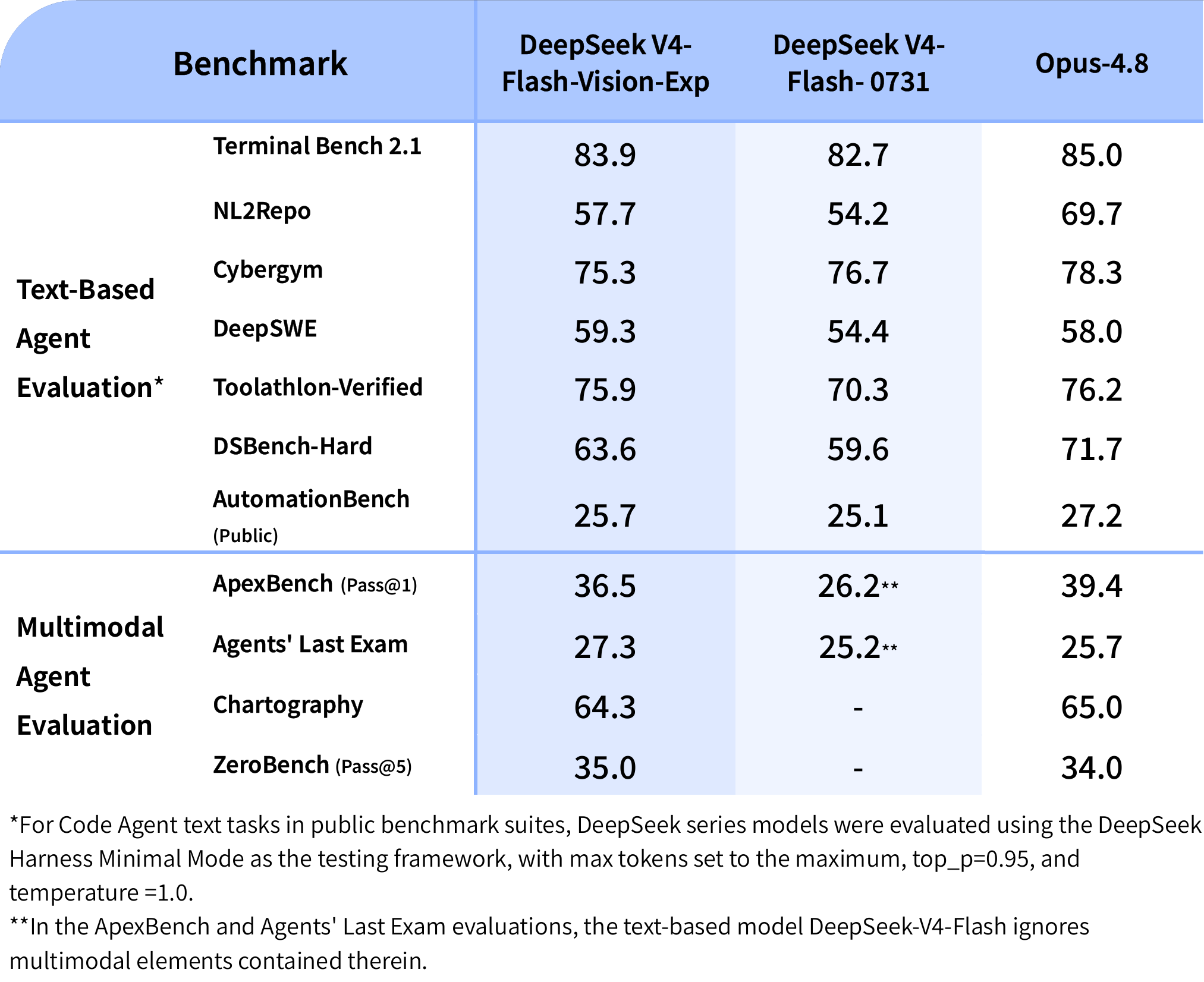
The headline release is deepseek-v4-flash-vision-exp. It accepts mixed text and image input, enabling prompts such as “explain this chart,” “find the issue in this interface,” “read this screenshot,” or “use what you see to complete the task.” DeepSeek says its text capabilities remain on par with V4-Flash while its visual understanding substantially improves multimodal agent performance.
Images can be supplied in three ways: inline as base64, through an external HTTPS URL, or by referencing a file uploaded through the new Files API. Supported formats include JPEG, PNG, GIF, and WebP. Each image is tokenized for billing and can consume up to 384 input tokens.
The “Exp” label is important. This is an experimental model, so teams should evaluate stability, visual accuracy, latency, and prompt compatibility before making it the sole model behind a critical workflow.
2. Three compatible API styles
V4-Flash-Vision-Exp supports DeepSeek’s OpenAI-compatible Chat Completions endpoint, its Anthropic-compatible Messages endpoint, and the Responses API. This gives developers more flexibility when adapting an existing agent stack. For many integrations, the main changes are the DeepSeek base URL, API key, model name, and the request shape for image content.
The Responses API is especially relevant to agent applications because image inputs can appear in user or developer messages and in tool outputs. A tool can capture a screenshot, return it to the model, and let the model reason over the result during the same workflow.
3. The Files API reduces repeat upload overhead
DeepSeek’s new Files API lets a developer upload an image once and reference it later by file_id. The upload endpoint is free to use, while the image is billed when the vision model processes it. This can save bandwidth and simplify requests when the same diagram, product image, or interface screenshot is reused across several turns.
DeepSeek documents a 64 MiB maximum for a single uploaded file. Inline images have tighter request constraints, so the Files API is the better fit for reusable or larger assets. Teams should still design their own retention and deletion policies around any files they send to an external service.
4. V4-Pro is now the production-focused agent model
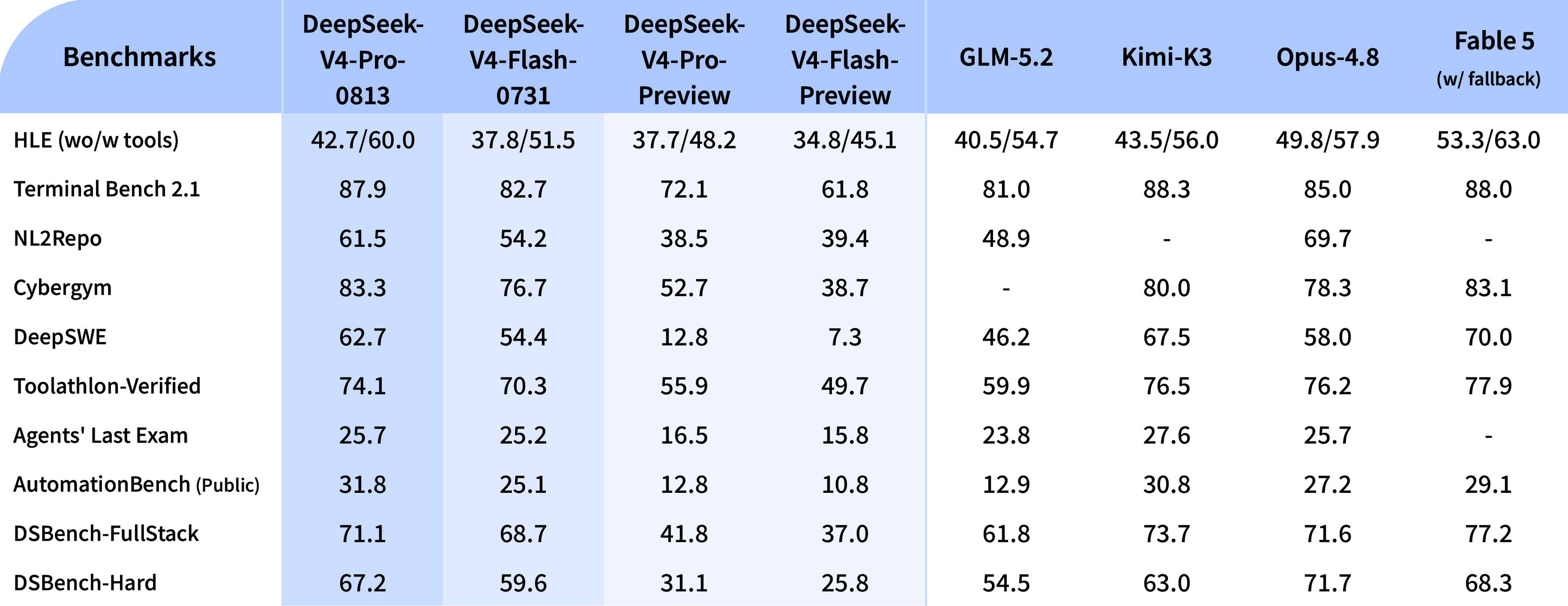
DeepSeek-V4-Pro moved from preview to general availability on August 13. DeepSeek says the GA model significantly improves agent capabilities, particularly in production-oriented coding and automation benchmarks. It is available in the DeepSeek app and web interface through Expert Mode and through the API as deepseek-v4-pro.
The model is positioned for complex coding, repository-level changes, long-horizon tool use, and demanding reasoning. V4-Flash remains the faster and more economical option, while the vision experimental model adds image input at V4-Flash pricing.
5. Low, high, and max reasoning effort
V4-Pro and V4-Flash now expose flexible reasoning effort. Low is intended for simpler requests where responsiveness matters. High targets everyday agent work, and max allocates more effort to difficult, multi-step tasks.
This is more useful than leaving every request at the deepest setting. A routing layer can send extraction, classification, and straightforward code edits to a lighter effort, then reserve max for architecture work, complex debugging, or high-uncertainty research. The best setting depends on output quality, latency, and cost in your own workload.
6. One-million-token context is standard
DeepSeek V4’s official models list a 1M-token context window and up to 384K output. That creates room for large repositories, collections of documents, long agent histories, and extensive tool results. A large window does not mean every token is equally useful: retrieval quality, context ordering, caching, and prompt design still influence the answer.
For production, send the smallest high-quality context that solves the task. Large contexts can increase latency and cost, and irrelevant material can make an agent less reliable.
7. DeepSeek Harness and agent integrations
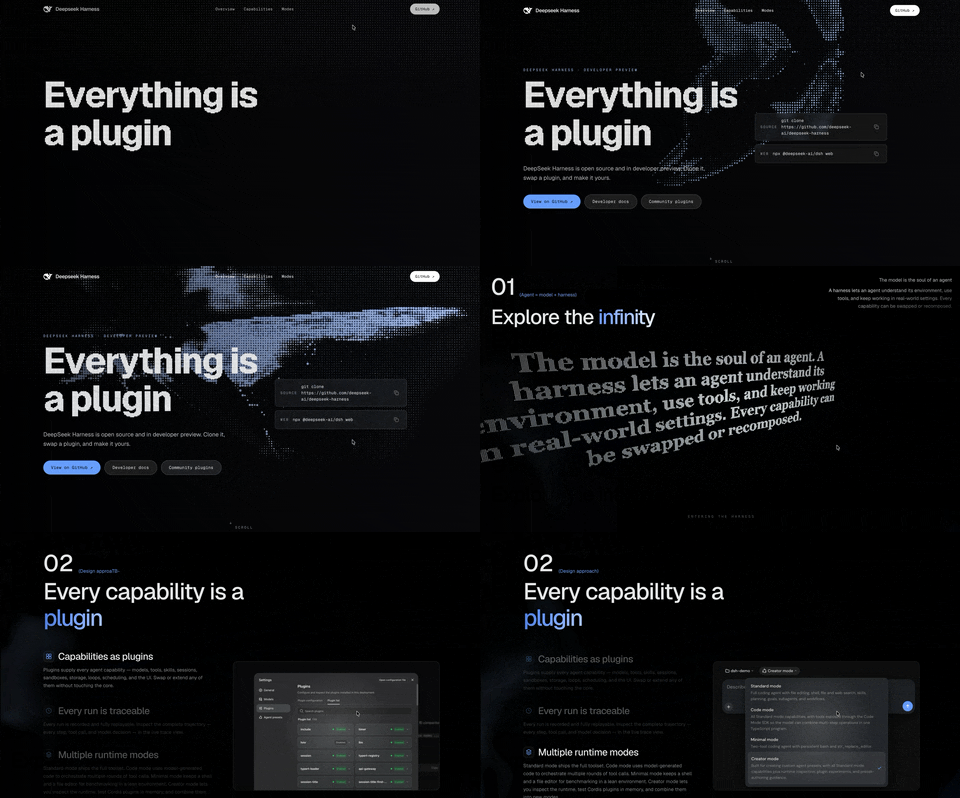
DeepSeek Harness 0.1.1 added out-of-the-box support for V4-Flash-Vision-Exp. DeepSeek also highlights compatibility with coding and agent tools through OpenAI and Anthropic API formats. Native Responses API support makes the V4 lineup easier to fit into tool-calling systems that already use response items and structured outputs.

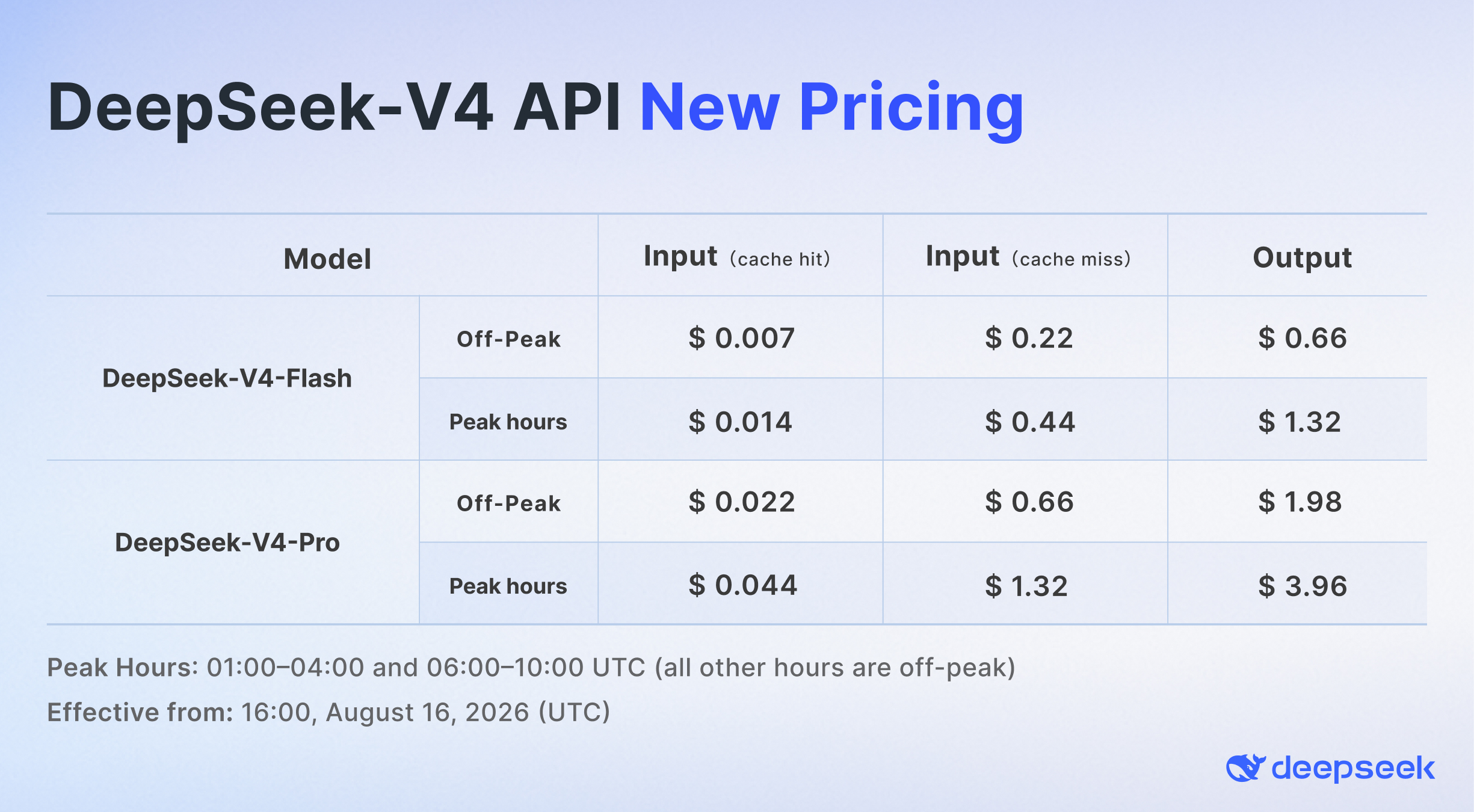
8. Peak and off-peak API pricing
DeepSeek introduced time-based V4 pricing on August 16. Off-peak rates are 50% lower than peak rates, giving batch workloads a reason to schedule non-urgent jobs outside the higher-cost periods. DeepSeek currently defines peak hours as 01:00-04:00 UTC and 06:00-10:00 UTC, Monday through Friday; all other hours are off-peak.
Pricing differs by model and by cached input, uncached input, and output tokens. Because vendor prices can change, check the live pricing page before calculating production budgets.
Which DeepSeek V4 model should you use?
- Choose V4-Flash for fast chat, economical agents, routine coding, classification, and high-volume workloads.
- Choose V4-Pro for difficult reasoning, longer agent tasks, repository-level coding, and production workflows where quality matters more than minimum latency.
- Choose V4-Flash-Vision-Exp when the task requires screenshots, charts, photos, diagrams, or other image inputs and experimental status is acceptable.
Limitations to consider
- V4-Flash-Vision-Exp is experimental and may change.
- Images are understood, not generated; this release is a vision-input model.
- Visual answers can still misread text, charts, spatial relationships, or small details.
- Vendor-reported benchmarks depend on frameworks, prompts, effort settings, and test conditions.
- A 1M context window does not remove the need for retrieval and context management.
- Peak pricing can surprise workloads that are not scheduled or monitored carefully.
Verdict
DeepSeek’s August updates make V4 a much more complete agent platform. V4-Pro supplies the production-focused reasoning and tool-use model, V4-Flash keeps speed and cost attractive, and V4-Flash-Vision-Exp adds the missing ability to inspect images. The Files API and broad interface compatibility make the vision release practical to integrate, while reasoning controls and time-based pricing give teams more levers to manage quality and cost.
The strongest next step is a small evaluation set drawn from a real workflow: screenshots with known answers, tool-use tasks, long-context retrieval tests, and a cost comparison across effort settings. That will reveal more than any single public benchmark.
Try DeepSeek V4 on the official site
Source note: This article is based on DeepSeek’s official August 2026 release notes, API documentation, model and pricing pages. Features and prices may change.