Typeform’s MCP Server: Build, Theme and Publish Forms From Claude or ChatGPT
Update — 4 October 2026Typeform has since published an October changelog entry, and this post originally said there was none. The October entry is Typeform Pages: an AI.

Update — 4 October 2026
Typeform has since published an October changelog entry, and this post originally said there was none. The October entry is Typeform Pages: an AI landing page builder, documented as free on every plan, currently in closed beta. We have covered it separately in Typeform Pages: an AI landing page builder, free on every plan.
We have also corrected the September section below. It originally said the theming entry was the only September item; Typeform also shipped Research Flow that month, which we had missed.
Typeform’s September changelog has exactly one entry, and on the face of it it looks minor: you can now ask Claude to list available themes and apply one to a form. Read it next to the help-centre documentation, though, and it is the last piece of something bigger — you can now build, theme and publish a Typeform entirely by talking to an AI, without opening the builder.
There is also a change buried in the same documentation that will quietly break existing setups, so start there.
What changed in September 2026
The full September changelog entry, verbatim: “Use Claude or Typeform MCP server to apply a theme: When creating or updating forms with Claude or the Typeform MCP server, you can ask for a list of available themes and apply a theme to a form.”
Typeform published two items in September. The theming entry matters because theming was the obvious gap — an AI could previously build you a form with the right questions and logic, and then hand you something that looked nothing like your brand. Now it can finish the job.
The second September item has nothing to do with MCP, and is the bigger product: “🧪 Research Flow: Create an AI-moderated research study to run qualitative research faster and at scale.” Research Flow is not bundled into any of the self-serve plans — on typeform.com/pricing it sits in its own block marked NEW with a “Contact sales” button, offering built-in panel recruitment and screening, moderated and unmoderated video research, automatic transcription and tagging, AI analysis, and shareable highlight reels.
Typeform dates its changelog by month only, never by day, so “September 2026” is as precise as anyone can honestly be about when this shipped. The October entry, published after this post first went live, is Typeform Pages — see the update note at the top.
What the Typeform MCP server actually is
MCP — Model Context Protocol — is the standard that lets an AI tool call another app’s functions. Typeform runs an MCP server, and Claude’s Typeform connector is just that server with a nicer front door. ChatGPT and any other MCP-capable client connect to the same thing.
| Where your account is hosted | MCP server URL |
|---|---|
| Global / default | https://api.typeform.com/mcp |
| EU (option 1) | https://api.eu.typeform.com/mcp |
| EU (option 2) | https://api.typeform.eu/mcp |
If you are on an Enterprise account hosted in an EU data centre, Typeform says to add it in Claude as a custom connector using one of the EU URLs rather than installing from the Connectors Directory.
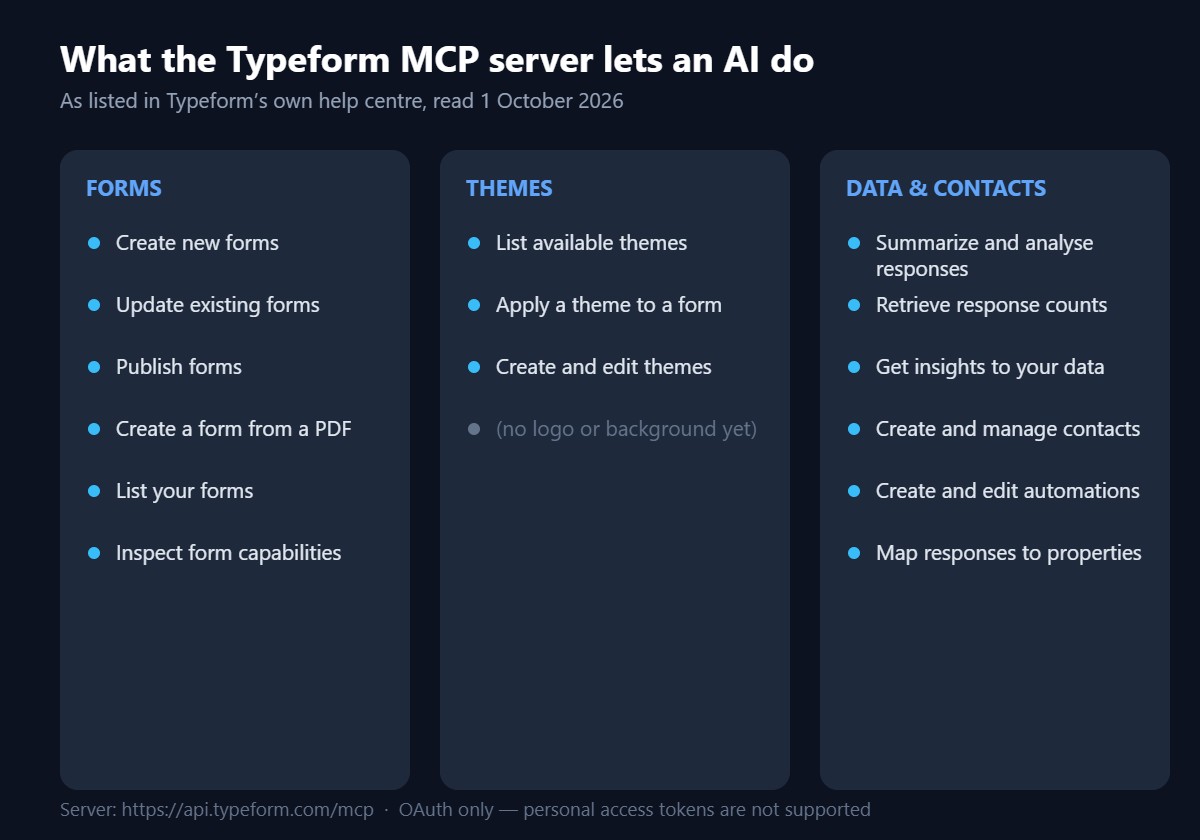
What you can actually do with it
Forms
- Create new forms from a description
- Create a form from a PDF you upload — the most under-rated item on the list
- Update existing forms (reorder questions, change which are required)
- Publish forms
- List your forms, and inspect which capabilities a form supports
Themes — new in September
- List available themes
- Apply a theme to a form
- Create and edit themes
- Not yet supported: adding a logo or background image to a theme
Data, contacts and automations
- Summarize and analyse responses, and retrieve response counts
- Get insights into your data
- Create, update and manage contacts and contact lists
- Create and edit automations
- Map form responses to contact properties
How to connect Typeform to Claude
1. Open Claude and go to Customize in the sidebar
Then select Connectors.
2. Click Add, then Browse connectors
Search the Connectors Directory for “Typeform” and open it.
3. Click Connect and authorize
Log in to Typeform if prompted, review the permissions Claude is requesting, and click Authorize.
4. Set your tool permissions
This is the step worth slowing down on — see below.
5. Turn Typeform on for the conversation
If Typeform is not active in a chat, click the + in the lower-left, hover over Connectors, and switch Typeform on.
If the connector shows no tools after connecting, Typeform says this is a known temporary issue: open the connector on the Connectors page, click the three-dot menu, and choose Refresh tools list.
Set the permissions deliberately
Typeform groups the connector’s tools into read-only and write/delete categories, and each gets one of three settings:
| Setting | What it means | Sensible use |
|---|---|---|
| Always allow | The tool runs without asking you each time | Read-only tools — listing forms, counting responses |
| Needs approval | You approve before it runs | Anything that writes: creating, updating, publishing |
| Blocked | The tool cannot be used at all | Delete tools, unless you specifically want them |
Typeform’s own warning is worth repeating: review changes before publishing them, because editing a form that is already live and collecting responses can affect your existing results. “Needs approval” on write tools is the setting that stops an enthusiastic AI from republishing a live form.
Prompts that work
Starting points, from Typeform’s documentation
- “Show me all the Typeform tools you can use for my account.”
- “Create a customer feedback form with Name, Email, NPS, and Text questions in Typeform.”
- “Update my onboarding form in Typeform so the Email question is required and move it before Company size.”
- “Use the information in this PDF I’m uploading to create a form in my Typeform account.”
- “Summarize recent responses for my form in Typeform.”
- “List all available themes for forms.” then “Apply Glossy Locks Purple theme to the form.”
One practical tip from the documentation: say “Typeform” explicitly in the prompt. “Make a customer feedback form” may get you a generic answer; “Use Typeform to create a customer feedback form” routes it to the connector.
The limits worth knowing before you rely on it
Current constraints
- OAuth only. Personal access tokens are not supported for MCP connections at all — not in Claude, not anywhere.
- Themes cannot take a logo or background image through the AI yet. You still need the builder for those.
- Your AI client may need allowlisting. Typeform says that if the MCP server rejects your connection at the authentication step, it means your AI agent or MCP client has to be added to their allowed-clients list — there is a request form for it.
- EU Enterprise hosting needs the custom-connector route, not the directory listing.
- Typeform’s help article URL still carries a “beta” slug, though the page title no longer says beta. Treat it as recent rather than battle-tested.
What else Typeform shipped recently
For context, the months either side of this one were much busier:
| Month | Highlights |
|---|---|
| October 2026 | Typeform Pages — an AI landing page builder, documented as free on every plan and currently in closed beta. Full breakdown here. |
| September 2026 | Theme listing and application via Claude / the MCP server; Research Flow, an AI-moderated qualitative research product sold separately via sales. |
| August 2026 | Contact Info and Address rebuilt as flexible Multi-Question Page templates; hide upcoming questions and hide answer choices with logic; recurring payments and subscriptions through Stripe; combine and compare responses across forms in Insights; email no longer required to create a contact. |
| July 2026 | Multiple questions on one form page; automations connectors for HubSpot and Klaviyo. |
We covered the August batch, including the Stripe subscriptions change, in a separate post linked below.
If you want to try any of this, Typeform is at typeform.com — the MCP server is part of the product rather than a paid add-on, as far as their documentation states.
Frequently asked questions
What is the Typeform MCP server URL?
For most accounts it is https://api.typeform.com/mcp. EU-hosted accounts use https://api.eu.typeform.com/mcp or https://api.typeform.eu/mcp.
Can I use a Typeform personal access token with Claude?
No. Typeform states that personal access tokens are no longer supported for MCP connections. The Typeform MCP server supports OAuth only, so previously working token-based setups need to be reconnected through Claude’s Connectors Directory.
Can Claude apply a theme to a Typeform?
Yes, as of the September 2026 update. Claude can list available themes, apply a theme to a form, and create or edit themes. Adding a logo or a background image to a theme is not supported yet.
Can I create a Typeform from a PDF?
Yes. Typeform lists “create a form from a PDF you upload” as a supported action through the MCP server, so you can upload a document in Claude and ask it to build the matching form.
Does the Typeform MCP server work with ChatGPT?
Yes. Typeform publishes separate instructions for ChatGPT, and any AI tool that supports custom MCP connectors can use the same server URL with OAuth.
Is it safe to let an AI edit my live Typeform?
Typeform warns that editing a form already collecting responses can affect existing results. Set write and delete tools to “Needs approval” rather than “Always allow”, and review changes before publishing.
What we could not verify
Open questions
- Whether MCP access requires a particular Typeform plan. No plan requirement is stated in any of the three help articles we read.
- Any rate limit on MCP calls, or whether MCP usage counts against API quotas.
- The exact day in September the theme capability shipped — Typeform dates its changelog by month only.
- Which AI clients are already on Typeform’s allowed-clients list, and how long an allowlisting request takes.
- Whether the connector is still formally in beta. The help article URL says beta; the page title no longer does.
Related on DailyAIPedia
- Typeform recurring payments and hide-question logic: the August 2026 update
- ChatLLM by Abacus.AI review: 100+ models for $10 a month
- Replit, Softr and Bubble: what shipped in September 2026
- MeDo now bills backends by size, daily
- 21st.dev review: 12,000 shadcn components, an MCP server and no monthly plan