
Typeform Pages: An AI Landing Page Builder, Free on Every Plan (Closed Beta)
Disclosure: this post contains an affiliate link to Typeform. If you sign up through it, DailyAIPedia may earn a commission at no extra cost to you. Nothing below.

Disclosure: this post contains an affiliate link to Typeform. If you sign up through it, DailyAIPedia may earn a commission at no extra cost to you. Nothing below was supplied, reviewed or paid for by Typeform — every figure was checked against their own documentation and pricing page on 4 October 2026.
On 1 October we published a walkthrough of Typeform’s MCP server and noted that there was no October changelog entry yet. There is now, and it is one sentence long:
“📑 Typeform Pages: Create and on-brand landing page for your project, campaign, event, or offer with Typeform Pages.”
— Typeform changelog, October 2026 (quoted verbatim, including the missing word)
That is the entire public announcement. No blog post. No press release. No entry on the pricing page. We searched typeform.com/pricing on 4 October and the words “Pages” and “landing page” appear zero times — not in the plan cards, not in the 100-plus row feature comparison table underneath them.
Behind that one sentence is a block-based AI website builder that can host a multi-page site on your own domain, is documented as free on every Typeform plan, and that almost nobody has written about. Here is what it actually does, what it costs, and the eight limits you will hit in the first hour.
What Typeform Pages actually is
Typeform has sold a “landing page builder” for years, and that older product is still live at typeform.com/landing-page-builder. It does one thing: it takes a typeform and dresses it up so the form is the page. Typeform’s own copy for it still reads “Turn your form into an engaging landing page” and “your form becomes the core of the page rather than an embedded element.”
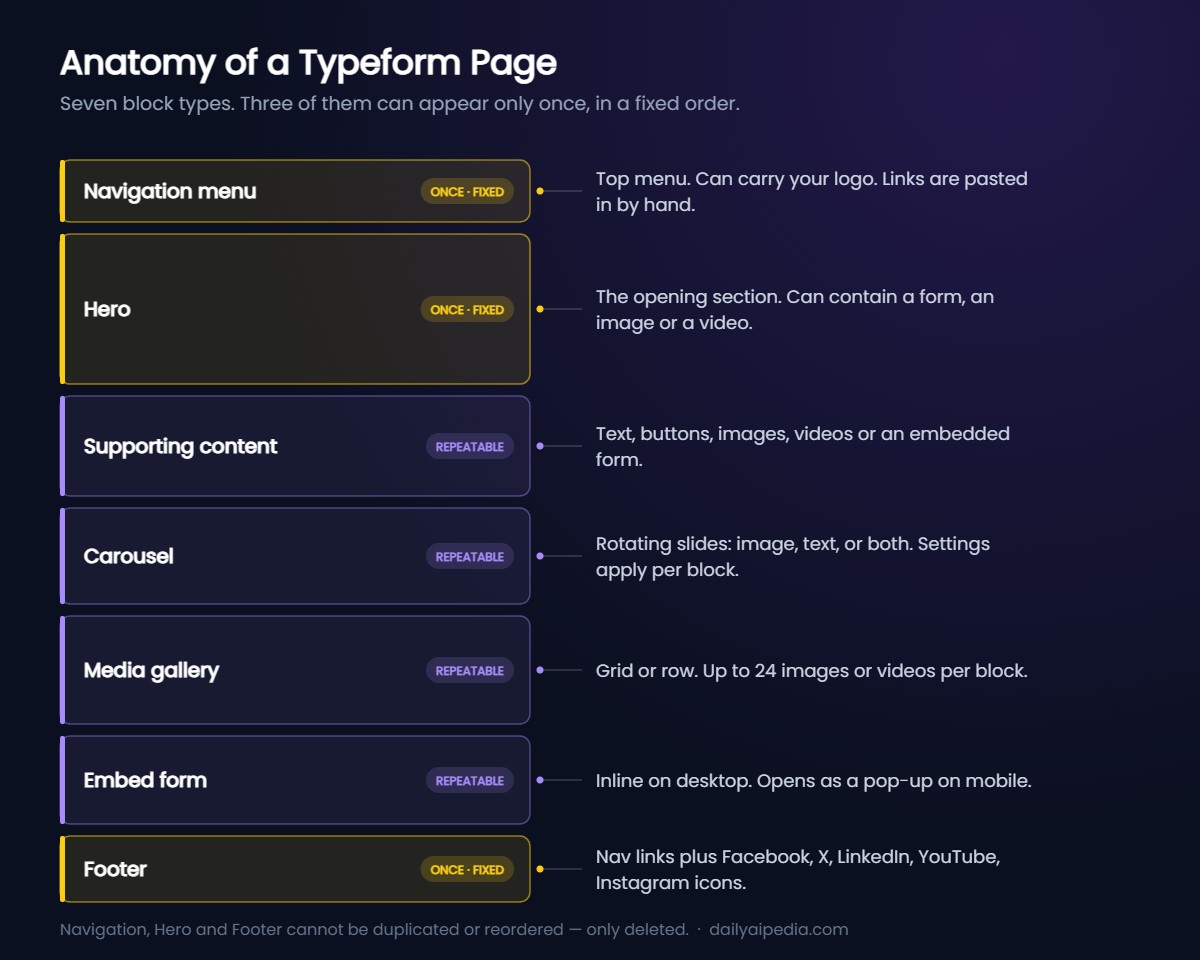
Typeform Pages is not that. It is a separate product, in a separate workspace, with a separate theme system, and a form on it is optional. You describe the page you want in a chat box, Typeform AI generates a draft made of stacked blocks, and you refine it by chatting or by double-clicking text in the builder.
The confusing part: both products exist at the same time, under similar names, and the public marketing page describes only the old one.
The beta status contradicts itself
Typeform’s own documentation gives two different answers. The main Pages article says: “Typeform Pages is available on all Typeform plans. Pages is currently in beta, and access may need to be enabled for your account.” Two other articles — the custom domains guide and the multi-page sites guide — both say: “Typeform Pages is currently in closed beta.”
“Available on all plans” and “closed beta” are not the same claim. In practice the second one is the operative constraint: being on a paid plan does not get you in. All three articles agree on the test — if you do not see the option to create a page, it is not enabled for your account yet.
So treat “free on every plan” as a statement about what Typeform intends to charge, not about what you can use today. We have no way to verify the size of the beta or how accounts are selected, and Typeform has not published either.
It is a website builder, not just a landing page builder
This is the part the one-line changelog entry buries. Typeform published a separate guide titled “How to create multi-page sites using Typeform Pages,” which opens: “Your website is more than just a landing page; it’s your company’s home on the web.”
The mechanism is custom domains with paths. Connect a domain you own, then assign each page its own path. Typeform’s own example:
acme.com
acme.com/products
acme.com/support
acme.com/about
acme.com/summer-campaign
acme.com/holidays2026
Or keep your main site elsewhere and put campaign pages on a subdomain — try.acme.com/summer-campaign — so your existing traffic routing is untouched. Domain setup runs through Entri, which tries to detect your registrar automatically; Typeform’s own screenshots use Hostinger as the example provider. Authorisation can take up to 48 hours.
The custom domain rules, verified
- Up to 3 custom domains per account. Each can serve many pages as long as every page has a unique path. More than three requires contacting support.
- Available on all plans — Typeform states this explicitly for Pages domains, which is unusual; connecting a custom domain to your forms is Enterprise-only on the published feature table.
- Separate from your form domains. If you already set up a custom domain for forms, you have to set one up again for Pages.
- Organisation owners and admins only. A regular team member cannot connect the domain.
- Without a custom domain you get a default Typeform URL, and “the option to customize your URL is coming soon.”
The catch nobody mentions: there is no site-level navigation. To link your pages together you open each page, copy its URL from Publish settings, then paste it into the navigation block and the footer block of every other page, by hand. Typeform’s guide walks through exactly this. For a three-page site that is manageable. For a ten-page site, every new page means editing nine others.
What it costs
Pages itself is documented as free on every plan, including the free plan. What you are really paying for is Typeform underneath it. These are the live monthly prices as displayed on typeform.com/pricing on 4 October 2026, in USD, on the monthly toggle:
| Plan | Monthly | Responses / mo | Seats | Yearly saving (stated) |
|---|---|---|---|---|
| Free | $0 | Not listed on the plan cards | — | — |
| Basic | $28 | 100 included, 750 max | 1 | $132/yr |
| Plus | $56 | 1,000 | 3 | $276/yr |
| Business | $91 | 10,000 | 5 | $456/yr |
| Growth Flow | $266 | 10,000 | 5 | 14-day free trial, card required |
| Talent | from $119 | Not stated on the main cards | — | — |
| Enterprise | Custom | Custom | Custom | — |
Typeform advertises “Save 30%” on yearly billing. The Contacts & Automations add-on is +$25/mo for 2,400 actions (every plan except Free and Basic) or +$75/mo for 12,000 actions (every plan except Free, Basic and Plus). Research Flow is not a plan tier at all — it is a “Contact sales” product on the same page.
The branding trap. Removing Typeform branding from your forms is a Plus feature, at $56/mo. Hiding the “Powered by Typeform” badge on your Pages is a different setting with a different gate: “This setting is available on Business plans and above.” That is $91/mo. If an unbranded landing page is the point, Plus will not get you there — budget for Business.
How to build one
1. Open Typeform Pages and pick a workspace
Every Form workspace automatically has a Pages workspace with the same name, but they are stored separately — you will not see your forms in the Pages workspace, or your pages in the forms workspace. Expect to hunt for things for the first five minutes.
2. Describe the page in the chat box
Typeform’s own example prompts are specific rather than clever: “Create a landing page for my webinar and embed my event registration form. I’ve linked the form here: [paste form link].” Naming the form or pasting its share URL is what makes the AI attach the right one.
3. Pull in context from connected apps, if you have them
With Typeform AI connectors you can bring in material from Canva, Notion, Slack, Shopify Storefront and Stripe instead of typing it all into the prompt. The Stripe one is the interesting one: Typeform documents using it to generate checkout links for products or bundles directly on the page.
4. Decide where the form goes — or whether there is one
Embedded in the Hero block if filling it in is the whole point (sign-ups, RSVPs, registrations, quote requests). Behind a button that opens a pop-up if the form supports the content rather than being it (feedback, surveys, contact). On mobile, an embedded form opens as a pop-up either way. Publish the form before you link it.
5. Make the embed stop looking like an embed
Typeform’s own blend-in checklist: turn off Typeform branding, turn off the navigation arrows, turn off the progress bar, and use a form theme with no logo.
6. Set the SEO fields, which are better than you would expect
Favicon (JPG, PNG, GIF, SVG or ICO, max 4 MB), social image (JPG or PNG, max 4 MB), site name, title, description — Typeform asks you to keep it to 160 characters or less — and a “Show in search results” toggle that is on by default. Check that toggle before you publish a thank-you page you did not want indexed.
7. Publish, then publish edits
Publishing makes the page live. After that, changes sit in draft until you click Publish edits. Share gives you a link, a new-tab button and a QR code.
Eight limits you will hit in the first hour
| Limit | What it means in practice |
|---|---|
| You cannot choose your own stock images | Typeform’s FAQ is blunt: “At the moment, you can ask Typeform AI to change the media on your page, but you can’t manually choose specific images from Unsplash or Pexels.” You prompt and hope. You can upload your own images. |
| You cannot upload a logo from the Design panel | Logos have to go through the AI chat. Typeform states the Design panel upload “isn’t” available yet. |
| Page themes drift from form themes | On first open Typeform copies and adapts your form themes for Pages. After that they never sync again — a new form theme will not appear in Pages, and deleting a form theme leaves its page twin behind. |
| Navigation, Hero and Footer are locked | One each, in a fixed order, and the only menu option you get on them is Delete. No duplicating, no reordering. |
| Cross-page links are manual | No sitewide navigation. Every link between pages is copied and pasted into every page’s nav block and footer block individually. |
| You cannot copy a page to another workspace | Not available. The documented workaround is duplicate, then move. |
| You cannot move a page across organisations | Flat no. Within the same organisation is fine. |
| Deleting a page is permanent | Typeform warns the action “is permanent and cannot be undone.” There is no trash to recover from. |
Who this is for
Worth trying if you already pay for Typeform, you need a campaign or event page today, and the page’s job is to get a form filled in. The embed is first-class rather than an iframe bolted onto someone else’s page builder, the form-to-page redirect from an Ending screen is built in, and three custom domains on any plan is genuinely more generous than Typeform’s form-side domain rules.
Not worth switching for if you need a real CMS, a blog, more than a handful of pages, pixel control over layout, or the ability to pick your own images. The manual cross-linking alone rules out anything that grows. And if the point is an unbranded page, remember that the badge toggle starts at Business, not Plus.
If you want to see whether your account has been let into the beta, Typeform is at typeform.com — open a workspace and look for a Pages section. If it is not there, it has not been enabled for you, and there is currently no published way to request it.
Frequently asked questions
Is Typeform Pages free?
Typeform’s Pages documentation states it is “available on all Typeform plans,” including the free plan, and that adding a custom domain to a Page is also available on all plans. There is no separate Pages price and no Pages row on typeform.com/pricing as of 4 October 2026. The practical cost is whatever Typeform plan you are on, and one Pages setting — hiding the “Powered by Typeform” badge — requires Business ($91/mo) or above.
How do I get access to Typeform Pages?
There is no published sign-up or waitlist. Two of Typeform’s help articles describe Pages as being in closed beta, and all of them give the same test: open a workspace and look for the option to create a page. If it is not there, Pages has not been enabled for your account yet.
Can I use a custom domain with Typeform Pages?
Yes, and on any plan. You can configure up to 3 custom domains, each serving multiple pages via unique paths. Setup runs through Entri, which attempts to detect your registrar automatically, with a manual DNS route if it cannot. Authorisation can take up to 48 hours. Only organisation owners and admins can set this up, and Pages domains are entirely separate from the custom domains you may already have on your forms.
Can I build a full website with Typeform Pages?
Typeform publishes a guide for exactly this: create one Page per section, connect them under one custom domain using paths such as /about and /pricing, and give every page the same navigation menu and footer. The catch is that there is no sitewide navigation — you link pages to each other by copying each page’s URL and pasting it into every other page’s nav and footer blocks by hand.
How do I remove “Powered by Typeform” from a Typeform Page?
Open Settings, go to General settings, toggle on “Hide ‘Powered by Typeform’ badge,” and click Save. Typeform states this setting is available on Business plans and above. Note that this is a different gate from removing Typeform branding on forms, which is a Plus feature.
Does a Typeform Page have to contain a form?
No. Typeform’s own FAQ says forms are optional on Typeform Pages. You can embed one in the opening Hero block, embed one lower down the page, link one behind a button so it opens in a pop-up, or have none at all.
Can I pick my own images from Unsplash or Pexels?
Not manually. Typeform’s FAQ states you can ask Typeform AI to change the media on your page but cannot choose specific images from Unsplash or Pexels yourself. You can upload your own images and logos through Typeform AI, and embed YouTube and Vimeo videos by pasting the link.
What we could not verify
Open questions, stated plainly
- Whether Pages is actually reachable on a free account. The documentation says all plans; two articles say closed beta. We could not test both at once, and Typeform has published no criteria for who gets in.
- The size or timeline of the beta. No announced GA date, no waitlist, no published way to request access.
- Whether the AI builder is any good. Everything above is drawn from Typeform’s documentation and live pricing page. We have not been able to generate a page and judge the output quality, so treat the “how to build one” section as a documented workflow, not a review of the results.
- Page-level performance. No load times, no Core Web Vitals, no information on what infrastructure serves a published Page or where.
- Whether the old form-as-landing-page product is being retired. typeform.com/landing-page-builder still sells it and still shows the full pricing table. Typeform has not said how the two relate.
Prices and feature gates verified against typeform.com/pricing and Typeform’s help centre on 4 October 2026. Typeform dates its changelog by month only, so “October 2026” is as precise as anyone can honestly be about the ship date. If anything below changes, this post gets a dated update box rather than a silent edit.
Related guides
- Typeform’s MCP server: build, theme and publish forms from Claude or ChatGPT
- Typeform’s August 2026 update: Stripe subscriptions, hidden questions and what it costs
- Typeform review 2026: AI forms, Growth Flow and automated customer workflows
- Typeform video questions: what they cost and when they are worth it
- Hostinger AI Builder in 2026: a real website builder for comparison