Video Upscaler Review 2026: AI Upscaling to 4K, and the 10× Gap Between Its Two Models
How this review came about: Video Upscaler submitted its tool to DailyAIPedia for editorial consideration. This is not a sponsored placement, we were not paid, and we hold.

How this review came about: Video Upscaler submitted its tool to DailyAIPedia for editorial consideration. This is not a sponsored placement, we were not paid, and we hold no affiliate link for it — the outbound links below are unpaid and marked nofollow. It is also not a hands-on test: we read features, limits and prices off Video Upscaler’s own homepage, pricing page and credit estimator, documentation and policies on 19 October 2026, and we have not upscaled our own footage. Prices are in US dollars.
This Video Upscaler review covers what it does, what it costs and who it is for. Video Upscaler, at videoupscaler.video, is a browser-based AI video enhancer. You upload a clip, choose an output size — 2×, 4×, HD, 2K or 4K — and a processing mode, and it returns a sharper, cleaner version with less noise and fewer compression artefacts. Dedicated modes target anime, old footage and phone or social clips, and the company states that it adds no watermark to finished videos.
The headline promise is that credits never expire, on subscriptions as well as one-off packs, which is a genuinely useful difference from the use-it-or-lose-it model most AI video tools run. The thing to understand before buying, though, is that “one credit” buys very different amounts of video depending on which of its two models you pick — and the gap is ten-fold.
Video Upscaler pricing
There are two ways to pay: a monthly or annual subscription, or a one-off credit pack. Both buy the same credits, with the same features and the same “never expire” rule.
| Plan | Monthly | Annual (per month) | Credits a month | Cost per credit |
|---|---|---|---|---|
| Starter | $15 | $12 | 300 | $0.050 monthly, $0.040 annual |
| Standard | $39 | $31 | 1,000 | $0.039 monthly, $0.031 annual |
| Premium | $79 | $63 | 2,500 | $0.032 monthly, $0.025 annual |
| One-off pack | Price | Credits | Cost per credit |
|---|---|---|---|
| 260 credits | $15 | 260 | $0.058 |
| 900 credits | $39 | 900 | $0.043 |
| 2,200 credits | $79 | 2,200 | $0.036 |
Packs and subscriptions are priced at the same $15, $39 and $79 points, so a pack is simply a smaller pile of credits with no renewal attached. If you will use the tool every month, the subscription gives 11–15% more credits for the same money; if your work comes in bursts, the pack avoids paying for months you do not need. We found no free credits or trial on the pages we read.
What a credit actually buys
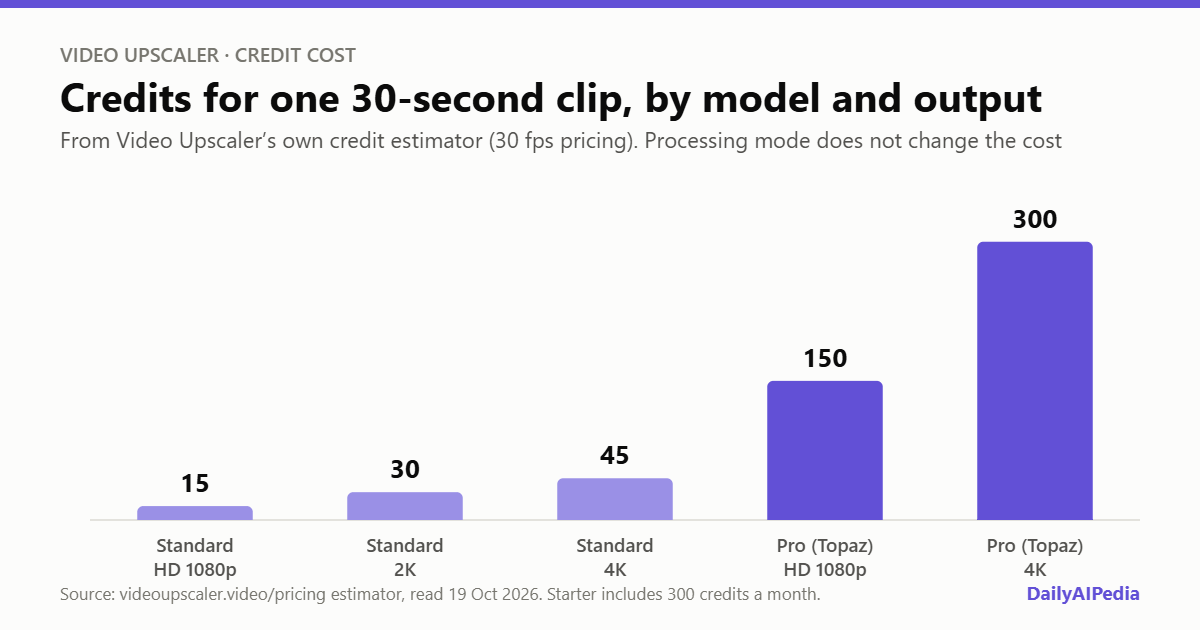
Video Upscaler does not publish a rate card, but its pricing page carries an estimator that it says uses the same calculation as the live service. Running it through every combination gave a clear pattern for a 30-second clip at 30 fps:
| Model | Output | Credits per 30 s | Credits per second | Cost on Starter (monthly) | Cost on Premium (annual) |
|---|---|---|---|---|---|
| Standard | HD 1080p | 15 | 0.5 | $0.75 | $0.38 |
| Standard | 2K | 30 | 1 | $1.50 | $0.76 |
| Standard | 4K | 45 | 1.5 | $2.25 | $1.13 |
| Pro (Topaz) | HD 1080p | 150 | 5 | $7.50 | $3.78 |
| Pro (Topaz) | 2K, 4K, 2× or 4× | 300 | 10 | $15.00 | $7.56 |
Three things follow from that table. The processing mode — general, social, short series, AI-generated or old film — made no difference to the estimate. Length is billed in 5-second tiers, so a 12-second clip is charged as 15. And the Pro model costs ten times the Standard model at the same output size, so the Starter plan’s 300 monthly credits cover twenty 30-second clips at Standard HD, or a single 30-second clip through Pro at 4K. The smallest $15 pack, at 260 credits, cannot cover even one.
The estimator’s own option values identify the two models as ByteDance’s video upscaler and Topaz’s, both served through the fal.ai platform. That is useful context: Topaz is one of the best-regarded names in video enhancement, and its premium here reflects its cost upstream.
Watch the default setting
Here is the detail we would flag to any reader. The pricing-page estimator opens on the Standard model, which is where the attractive figures come from. The upload tool on the homepage, when we read it, showed its advanced settings preset to “Topaz · Proteus · 2×” — the Pro model, at the 10-credits-a-second rate.
The tool does show the credits required before you generate, so this is not hidden. But if you go straight from the pricing page to an upload without opening the advanced settings, you could spend a month of Starter credits on one clip. Our advice: test on Standard first, at HD, on a 5- or 10-second sample, and move to Pro only for the final clips where Standard is visibly not good enough. The company’s own documentation gives the same advice — start with HD, then move to 4K.
One more quirk: the estimator’s “approximate jobs per package” line shows a year’s worth of jobs on the subscription tabs — 240 Standard HD clips for Starter, rather than the 20 that one month’s 300 credits buys. On the credit-pack tab the figures are per pack. Read the numbers with that in mind.
Limits and formats
| Limit | Detail |
|---|---|
| Clip length | Up to 60 seconds per upload |
| File size | 200MB or smaller |
| Input formats | MP4, MOV, WebM, M4V and GIF |
| Outputs | 2×, 4×, HD, 2K and 4K; targets the source cannot support are disabled |
| Modes | General, Face Restore, Denoise and Anime in the docs; general, UGC, short series, AIGC and old film in the estimator |
| Watermark | None added to completed output, per the FAQ |
| Processing time | Not guaranteed; varies with length, model, resolution and queue |
The 60-second cap is the limit that defines the product. This is a tool for clips — a social video, an old home-movie snippet, a scene from an AI-generated short — not for upscaling a whole film or a long interview. Anything longer has to be cut into pieces first, and every piece is billed separately.
Refunds, failures and terms
Credits for a task recorded as failed are restored, according to the FAQ. Paid refunds are narrower: the payments policy says purchases are generally non-refundable once credits are available, with exceptions for duplicate, unauthorised or erroneous charges, and requests must be made within 7 days of the charge. Dissatisfaction with output quality is explicitly excluded. Payments go through Stripe or Creem, subscriptions renew automatically, and cancelling stops the next renewal.
The terms make users retain ownership of what they upload, cap liability at the greater of 12 months’ fees or $100, and do not name the company behind the service. The privacy policy says uploaded files and outputs are kept as long as reasonably necessary, without a fixed deletion period, though you can request deletion.
Who should try it
Video Upscaler suits creators and small teams who regularly need to rescue short clips: social editors working with compressed phone footage, anime or AI-video makers wanting a 4K export, and anyone restoring old snippets. The credits-never-expire rule makes the annual Standard or Premium plans reasonable for irregular use. It suits long-form work poorly, because of the 60-second cap, and it is a poor fit if you need guaranteed turnaround times or a named vendor for a client contract.
What we could not verify
Open questions, stated plainly
- Output quality. We have not processed our own footage, and AI enhancement can invent plausible detail, as the company itself notes.
- Free trial or credits. None is mentioned on the pages we read, which makes a low-cost first test harder; the smallest outlay is the $15 pack.
- Frame rate pricing. The estimator uses 30 fps pricing. Whether 60 fps clips cost twice as much is not stated.
- Audio. None of the pages we read says whether the original audio track is kept in the output.
- Who runs it. No company name or country appears in the terms, policies or footer.
- Retention. There is no fixed deletion period for uploaded videos.
Verdict
Video Upscaler is a straightforward way to sharpen short clips up to 4K, with a choice of a cheap ByteDance-based model and a premium Topaz-based one, no watermark, and credits that never expire — the last of which is a real point in its favour.
Its pricing is fair once you read it properly, and that is the catch. The ten-fold gap between Standard and Pro, an upload tool preset to Pro, and a jobs estimate that counts a year at a time all make the plan look more generous than a first month will feel. Start on Standard at HD, confirm the result is good enough, and treat Pro as a finishing tool rather than the default.
All prices, limits and features above were read off Video Upscaler’s own homepage, pricing page and credit estimator, FAQ, payments and refund policy and terms of service on 19 October 2026. The credits-per-second and per-clip dollar figures are our own arithmetic from the estimator and published prices. Video Upscaler submitted this tool to DailyAIPedia for consideration and we hold no referral link for it. If prices change materially, this post gets a dated update box rather than a silent edit.
Video Upscaler review: Frequently asked questions
How much does Video Upscaler cost?
Subscriptions are $15, $39 or $79 a month for 300, 1,000 or 2,500 credits, or $12, $31 or $63 a month billed annually. One-off packs cost $15 for 260 credits, $39 for 900 and $79 for 2,200. Credits never expire on either.
How many credits does Video Upscaler use per video?
On its estimator, a 30-second clip costs 15 credits at HD, 30 at 2K and 45 at 4K on the Standard model, and 150 at HD or 300 at 2K or 4K on the Pro Topaz model. Processing mode does not change the cost, and length is billed in 5-second steps.
Is there a free trial for Video Upscaler?
We did not find a free trial or free credits on Video Upscaler’s pages. The smallest purchase is a $15 pack of 260 credits, enough for about 17 thirty-second clips on the Standard model at HD.
What are Video Upscaler’s upload limits?
One clip of up to 60 seconds and 200MB, in MP4, MOV, WebM, M4V or GIF. Outputs are 2×, 4×, HD, 2K or 4K, and targets the source cannot support are disabled.
Does Video Upscaler add a watermark?
No. Its FAQ says the service does not add a promotional watermark to completed output.