AllSubConverter Review 2026: A Free In-Browser Fix for Subtitles That Drift Out of Sync
How this review came about: AllSubConverter submitted its Subtitle Framerate Converter to DailyAIPedia for editorial consideration. This is not a sponsored placement, we were not paid, and we.
How this review came about: AllSubConverter submitted its Subtitle Framerate Converter to DailyAIPedia for editorial consideration. This is not a sponsored placement, we were not paid, and we hold no affiliate link for it — the outbound links below are unpaid and marked nofollow. It is also not a hands-on test: we read features, limits and prices off AllSubConverter’s own tool, pricing and about pages on 16–17 October 2026, and we have not converted our own subtitle files. Prices are in US dollars.
If you have ever watched subtitles start perfectly in sync and then slide steadily further behind the dialogue, you have met a frame rate mismatch. AllSubConverter’s Subtitle Frame Rate Converter exists to fix exactly that: you pick the frame rate the subtitles were timed for, the frame rate of the video you are playing, and it rescales every timecode by the ratio between them.
It is one of more than 117 free tools on the site, which covers conversion, cleaning, syncing, merging, quality checks and a few AI features. The headline claim worth knowing up front is that the standard tools run entirely in your browser — your subtitle file is not uploaded to AllSubConverter’s servers.

Why subtitles drift, and how much
Film is usually shot and timed at 23.976 frames per second, while European PAL video plays at 25. Play one against the other and the video runs about 4% fast, so the error grows the longer you watch. That is why a simple offset never fixes it: the subtitles are right at the start and wrong everywhere else.
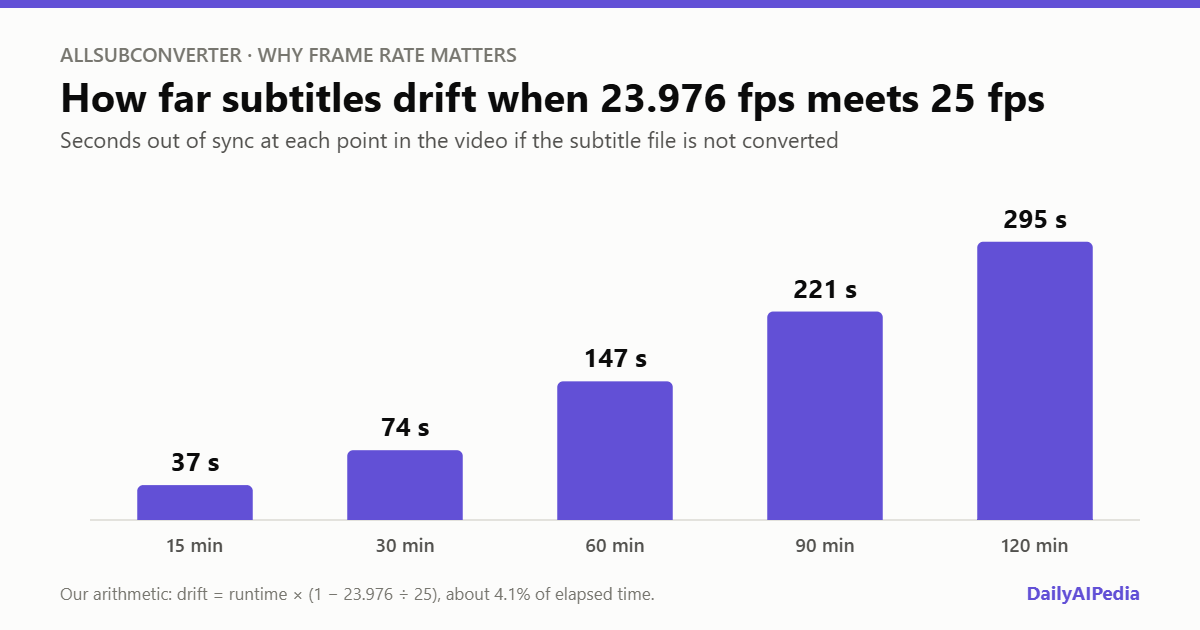
The fix is multiplication rather than addition. For 23.976 to 25, AllSubConverter multiplies every start and end time by about 1.0427, which shortens each cue by roughly 4% and cancels the speed-up across the whole file. Because it is a pure ratio, the spacing between cues is preserved.
What the frame rate converter does
| Feature | Detail |
|---|---|
| Frame rates | 23.976, 24, 25, 29.97, 30, 48, 50, 59.94 and 60 fps |
| One-click presets | 23.976 → 25, 24 → 25 and 29.97 → 25 |
| Input formats | SRT, VTT, ASS, SSA, LRC, SBV, TTML, SCC, STL, SMI (plus TXT and JSON on upload) |
| Output formats | SRT, VTT or ASS only |
| Processing | In the browser; the file stays on your device |
| Cost and sign-up | Free, no registration, no watermarks |
The workflow is five short steps: drop in the file, choose the source frame rate, choose the target frame rate, choose the output format, then convert and download. It also handles the less common cases: cinema subtitles at 24 fps moved to a 25 fps broadcast master, 29.97 to 30 fps North American deliverables, and standard-rate subtitles moved onto 48, 50 or 60 fps high frame rate video.
One limitation to note: the output is restricted to SRT, VTT or ASS. If you work with broadcast formats such as SCC or STL, you can read them in but you will need a second conversion step to get the same format back.
Pick the right tool: frame rate, sync or speed
AllSubConverter has three tools that sound alike, and picking the wrong one is the most likely way to make things worse.
| Symptom | Tool to use | What it does |
|---|---|---|
| Subtitles are early or late by the same amount throughout | Subtitle Sync | Adds a fixed offset, or a two-point linear shift |
| Subtitles start in sync and drift further out over time | Frame Rate Converter | Multiplies timecodes by the ratio of two named frame rates |
| The video was deliberately sped up or slowed down | Speed Adjuster | Scales timing by a playback factor you choose, such as 1.25× |
| Only one scene or section is wrong | Partial Subtitle Sync | Shifts a selected range of cues |
The rest of the toolkit
Beyond frame rates, the free tools cover format conversion across more than 40 routes, a subtitle editor, cleaners that strip tags and SDH annotations like [MUSIC], line-balancing, merging and splitting, bilingual merging, quality checks, diff and statistics, and a subtitle-to-PDF export. The AI tools — a translator, a rewriter and an annotator that can add pinyin or furigana — work differently: they need your own API key for OpenAI or an OpenAI-compatible provider, and your browser sends the subtitle text straight to that provider. You pay the provider for usage, so cost depends on the model and how many cues you translate.
That is worth flagging for a site in our AI Video category. The frame rate converter itself is not AI at all — it is deterministic arithmetic, which is exactly what you want for timing. The AI features are optional extras on top.
AllSubConverter pricing
| Plan | Price | What it adds |
|---|---|---|
| Free | $0 | All standard editing, cleaning, syncing and QA tools; batch processing up to 5 files per operation; bring-your-own-key AI; local history and snapshots |
| 24-Hour Pass | $2.99 one-off | Unlimited batch, multi-step pipeline workflows, unlimited project collections, full workspace backup and restore; no auto-renewal |
| Monthly | $5.99 / month | Everything in the pass, continuously; 7-day money-back guarantee |
| Annual | $49.99 / year | Same as monthly, about $4.16 a month; 7-day money-back guarantee |
Pro needs no account. After payment it activates in the browser you used to check out, with an email-based restore if you clear your browser data or switch machines. The 24-hour pass is the standout option: if you have one season of episodes to fix before a deadline, $2.99 covers the batch work and nothing renews.
Who should try it
Anyone who has downloaded a subtitle file that drifts against their copy of a film, video editors moving deliverables between PAL and NTSC, and translators or localisation teams who handle subtitle files daily. For a single file, the free tool is all you need. Pay only if you regularly process more than five files at once or want to chain conversion, cleaning and syncing into one pipeline.
What we could not verify
Open questions, stated plainly
- Output accuracy. We have not run our own files through it, so we cannot confirm how it handles malformed cues or unusual encodings in practice.
- The free batch limit. The pricing page caps free batch processing at 5 files per operation, while other pages describe batches of up to 200 files or 1GB. We read the higher figure as the technical ceiling and the 5-file cap as the free-plan limit, but the site does not reconcile the two.
- Who runs it. The about page credits only “AllSubConverter” and a support address, with no named company or country.
- Open-source status. The site links to a GitHub repository but does not state a licence or say the code is open source.
- Privacy of the AI tools. The standard tools stay on your device, but AI features send subtitle text to whichever provider you choose, under that provider’s terms.
Verdict
AllSubConverter’s frame rate converter is a small, well-scoped tool that solves a genuinely annoying problem properly: correct maths, sensible presets, no upload and no sign-up. Its documentation also explains the difference between drift and offset more clearly than most paid editors.
The wider site is generous for free, the paid tiers are cheap and honest, and the bring-your-own-key AI model keeps the company out of your subtitle text. Our only reservations are the unnamed operator and the confusing batch figures. For a free tool you can use without handing over a file, those are easy to live with.
All prices, limits and features above were read off AllSubConverter’s own frame rate converter page, pricing page and about page on 16–17 October 2026. The drift figures in the chart are our own arithmetic. AllSubConverter submitted this tool to DailyAIPedia for consideration and we hold no referral link for it. If prices change materially, this post gets a dated update box rather than a silent edit.
Frequently asked questions
Is AllSubConverter free?
Yes. The frame rate converter and the other standard tools are free with no registration and no watermarks. Pro, for unlimited batch processing and pipelines, costs $2.99 for 24 hours, $5.99 a month or $49.99 a year.
How do I fix subtitles that drift out of sync over time?
Gradual drift usually means a frame rate mismatch. Use a frame rate converter, set the frame rate the subtitles were timed for and the frame rate of your video, and convert. A fixed offset will not fix drift, because the error grows over time.
Does AllSubConverter upload my subtitle files?
Not for the standard tools, which run in your browser. The AI tools send subtitle text directly from your browser to the AI provider whose API key you supply.
Which formats does the AllSubConverter frame rate converter support?
It reads SRT, VTT, ASS, SSA, LRC, SBV, TTML, SCC, STL and SMI, and outputs SRT, VTT or ASS. It converts between 23.976, 24, 25, 29.97, 30, 48, 50, 59.94 and 60 fps.
What is the difference between subtitle sync and frame rate conversion?
Sync shifts every cue by a fixed amount, which fixes subtitles that are consistently early or late. Frame rate conversion multiplies every timecode by a ratio, which fixes subtitles that drift further out of sync as the video plays.