ElevenLabs Realtime Translation: Live Voice Translation in 90+ Languages, Who Can Use It and What It Costs
Disclosure: links to ElevenLabs on this page are referral links. If you sign up through them we may earn a commission, at no extra cost to you. Details.
Disclosure: links to ElevenLabs on this page are referral links. If you sign up through them we may earn a commission, at no extra cost to you. Details were read off ElevenLabs’ launch post (21 October 2026), its API reference and its 26 October changelog on 30 October 2026. We have not had access to test it.
ElevenLabs launched Eleven Realtime Translation on 21 October: live voice translation for phone calls, contact centres and events. We gave it a paragraph in our October update. This guide goes further: how ElevenLabs realtime translation works, the settings developers get, who can actually use it today, and what ElevenLabs has not said.
The short version
What: two people speak different languages and each hears the other translated, live, in a natural voice.
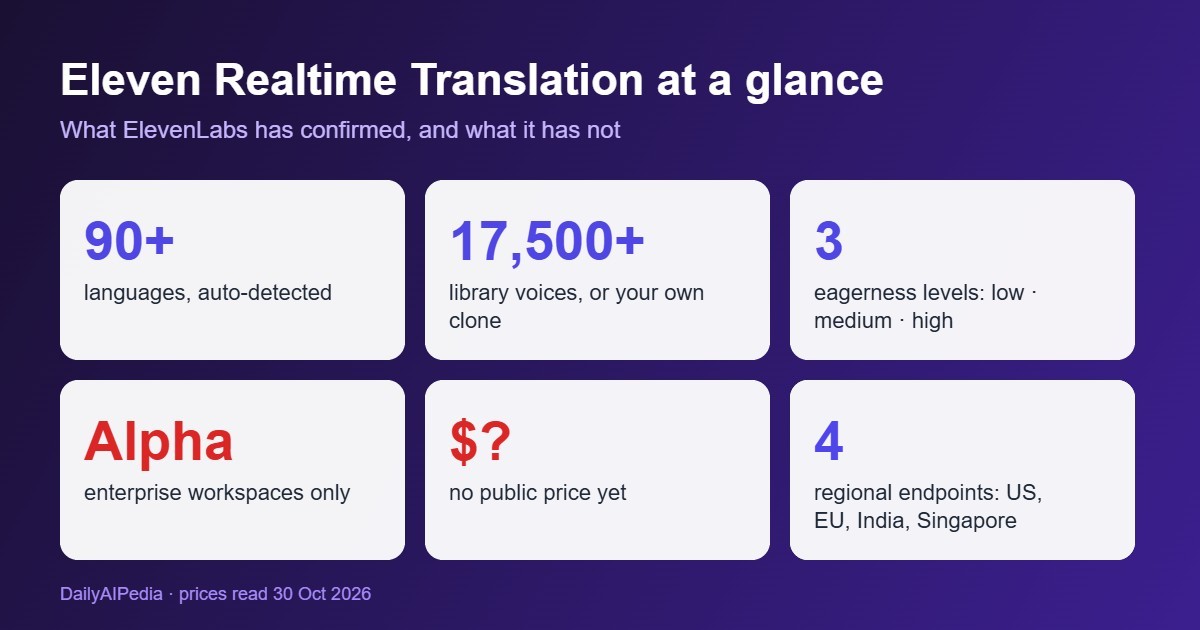
Scale: 90+ languages with automatic detection; any of 17,500+ library voices or your own voice clone.
Control: an “eagerness” setting trades speed (high) against translation quality (low).
Access: alpha, enterprise workspaces only, through sales. No public price.
For creators: pre-recorded video still goes through the Dubbing Studio on normal plans.
How ElevenLabs realtime translation works
Everything runs over one WebSocket connection. Your app streams the speaker’s audio in, in roughly 100 ms chunks, and gets four things back as the person talks:
- A live transcript in the speaker’s language (partial, then final).
- The translated text, handy for live captions.
- The translated speech as audio, in the voice you picked.
- Status and error messages, including rate-limit and quota warnings.
The language is detected automatically, so callers don’t pick one from a menu. By default the speech is generated with Eleven v4 Turbo, ElevenLabs’ low-latency voice model (see our v4 Turbo guide). For a two-way call you run one stream per direction.
The settings developers get
| Setting | Options | Why it matters |
|---|---|---|
| Eagerness | low, medium (default), high | High starts translating soonest, for quick back-and-forth. Low waits for more of the sentence, for better translations on complex calls such as billing or claims. |
| Voice | Any of 17,500+ library voices, or your own Instant or Professional Voice Clone | A brand or agent can sound the same in every language, and the voice stays fixed for the whole session. |
| Voice model | Eleven v4 Turbo (default), Eleven v3, Flash v2.5 | Choose between speed and expressiveness. |
| Languages | Source and target, or automatic detection | Callers don’t need to choose. |
| Text normalization | auto, on, off (default) | Controls whether numbers, dates and the like are spelled out before they are spoken. |
| Zero Retention Mode | on or off (default off) | For sensitive calls, so audio and text aren’t stored. |
| Region | Default, US, EU, India and Singapore data residency | Keeps call data in the region your rules require. |
Who can use it, and what it costs
Today, only enterprise customers. ElevenLabs calls it an alpha, its API docs say “currently for enterprise workspaces only”, and the launch post sends you to a sales form. There is no published price: not per minute, not in credits. We won’t guess one. If you are on Starter, Creator or Pro (see what each plan costs), you can read the docs but you can’t switch it on yet.
Where it fits, and where it doesn’t
| Use case | Fit | Why |
|---|---|---|
| Contact centres | Strong | One agent can serve callers in many more languages without an interpreter on the line. |
| Telecom operators | Strong | It can be built into the calling layer. Deutsche Telekom is already using it in its Magenta AI Call Assistant. |
| Live events and webinars | Good | Attendees hear the speaker in their own language. |
| YouTube videos, courses, podcasts | Wrong tool | Pre-recorded content doesn’t need live translation. ElevenLabs Dubbing Studio handles it on regular plans and lets you edit the result. |
| Solo creators and small teams | Not yet | Enterprise-only, with no self-serve price. |
Also new at ElevenLabs this week
The 26 October changelog added four smaller changes worth knowing:
- Clone strength for v4 voices: a 0–1 setting for how closely a Professional Voice Clone made for v4 sticks to its training samples. ElevenLabs recommends 0 for most uses. More in our voice cloning guide.
- Faster LLM option for agents: supported language models can run on a faster tier for lower latency, at a higher price per token. Standard stays the default.
- Website crawl exclusions: agent knowledge-base crawls can skip up to 50 URL patterns.
- Expiring API keys: service-account keys can be set to expire anywhere from 15 minutes to 90 days out.
What we could not verify
Open questions, stated plainly
Price. Nothing published, per minute or in credits.
Latency. No end-to-end delay figure for translation, only that it is built on the low-latency v4 Turbo.
The full language list. ElevenLabs says 90+ but does not list which language pairs work best.
Quality. We have not had access to test it, and no independent results have been published.
When it opens to self-serve plans.
Verdict
ElevenLabs realtime translation is one of the more useful things the company has shipped for businesses this year. A single natural voice across 90+ languages, a clear speed-versus-quality setting, and data-residency options are what contact centres actually ask for. But it is an enterprise alpha with no price, so most readers can’t buy it today. If you run a support team or a calling product, ask for alpha access now. If you are a creator who wants your videos in other languages, the Dubbing Studio already does that.
Try ElevenLabs Dubbing Studio →
Sources, all read 30 October 2026: ElevenLabs launch post (21 Oct 2026), Realtime Translation API reference, and the ElevenLabs changelog (26 Oct entry).
FAQ
What is ElevenLabs realtime translation?
Eleven Realtime Translation is a live voice translation model. Each person speaks their own language and hears the other side translated, in a voice you choose, while the conversation is happening. It launched on 21 October 2026.
How much does ElevenLabs realtime translation cost?
ElevenLabs has not published a price. It is in alpha for enterprise customers, and access goes through its sales team.
Can I use ElevenLabs realtime translation on a Creator or Pro plan?
Not yet. The API docs say it is currently for enterprise workspaces only. For pre-recorded video, the Dubbing Studio is the option available on regular plans.
How many languages does it support?
More than 90, with automatic detection of the language being spoken, according to ElevenLabs.
Can it translate in my own voice?
Yes. You can pick any of the 17,500+ library voices or use your own Instant or Professional Voice Clone, and the voice stays the same for the whole session.