Klap vs OpusClip (2026): OpusClip Is on Sale, Klap Has a 30% Code. Which Is Cheaper for You?
Disclosure: Links to Klap and OpusClip on this page are affiliate links (we are in both programs), and N4H6O83T is our Klap affiliate code. If you subscribe through.
Disclosure: Links to Klap and OpusClip on this page are affiliate links (we are in both programs), and N4H6O83T is our Klap affiliate code. If you subscribe through them we may earn a commission, at no extra cost to you. Klap contacted us and suggested this comparison; it did not see or approve the article. Being affiliates of both doesn’t change the numbers: every price comes from each company’s own pricing page. Prices were read off both pricing pages on 6 November 2026 (screenshots below). We have not yet run our own clipping test on either tool.
Klap and OpusClip do the same job: paste a YouTube link or upload a long video, and AI cuts it into vertical clips with captions for Shorts, Reels and TikTok. Two things changed this month. OpusClip cut its prices (Starter $15 to $12, Pro $29 to $23), and we now have a Klap code, N4H6O83T, for 30% off your first payment. Here is which one is cheaper for the videos you actually make.
The short version
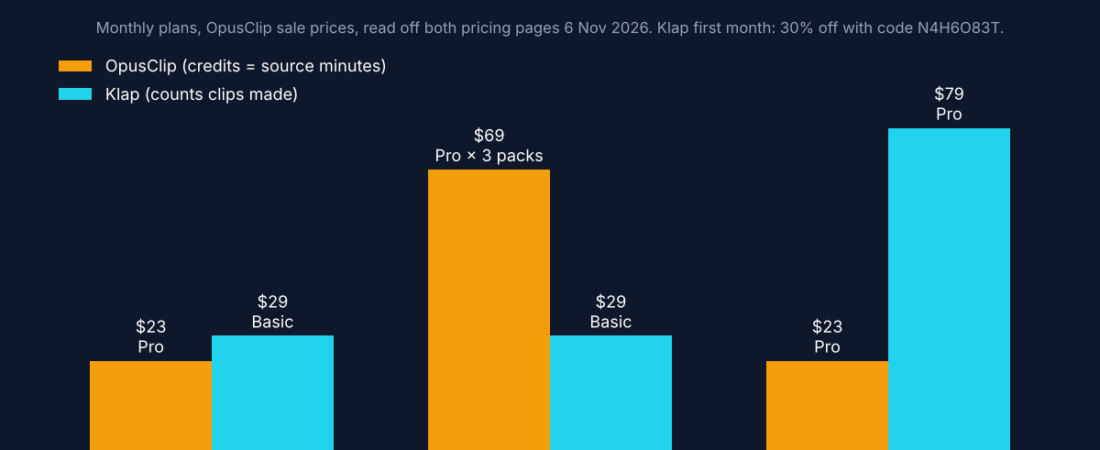
Cheapest start: OpusClip Pro at $23 a month or $11.50 a month yearly (sale price), vs Klap Basic at $29 a month ($20.30 the first month with N4H6O83T) or $14.50 yearly.
Different meters: OpusClip counts minutes of source video (300 a month on Pro). Klap counts clips produced (100, 300 or 1,000 a month) and ignores source length up to 3 hours.
Long videos: Klap. A month of 3-hour streams needs about three OpusClip Pro packs ($69) but fits Klap Basic ($29).
Many short videos: OpusClip. 300 minutes stretches across 30 ten-minute videos for $23.
Free: OpusClip has a free plan (watermark). Klap gives 1 free video to preview; downloading needs a paid plan.
Klap code: 30% off your first payment
N4H6O83T
Enter it at checkout on a monthly plan. Klap says codes don’t apply to yearly billing, which is already 50% off.

Klap vs OpusClip pricing (November 2026)
| Plan | Monthly | Billed yearly | What you get a month |
|---|---|---|---|
| Klap Basic | $29 ($20.30 first month with N4H6O83T) | $14.50/mo ($174/yr) | 100 clips |
| Klap Pro | $79 ($55.30 first month with code) | $39.50/mo ($474/yr) | 300 clips |
| Klap Pro+ | $189 ($132.30 first month with code) | $94.50/mo ($1,134/yr) | 1,000 clips |
| OpusClip Free | $0 | – | 60 credits, watermark, exports expire after 3 days |
| OpusClip Starter | Monthly only | 150 credits | |
| OpusClip Pro (1 pack) | 300 credits; extra packs add credits at the same price each | ||
| OpusClip Business | Custom | Custom | Custom |
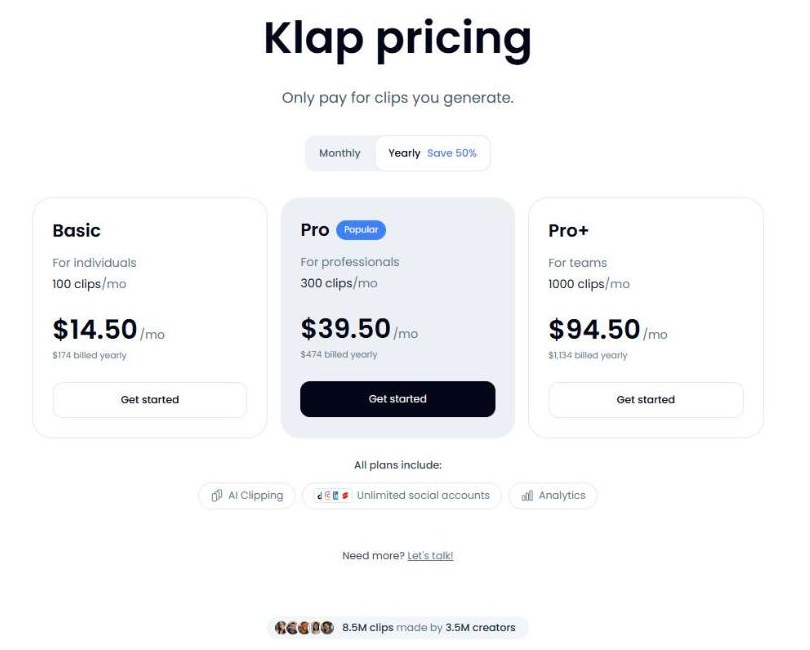
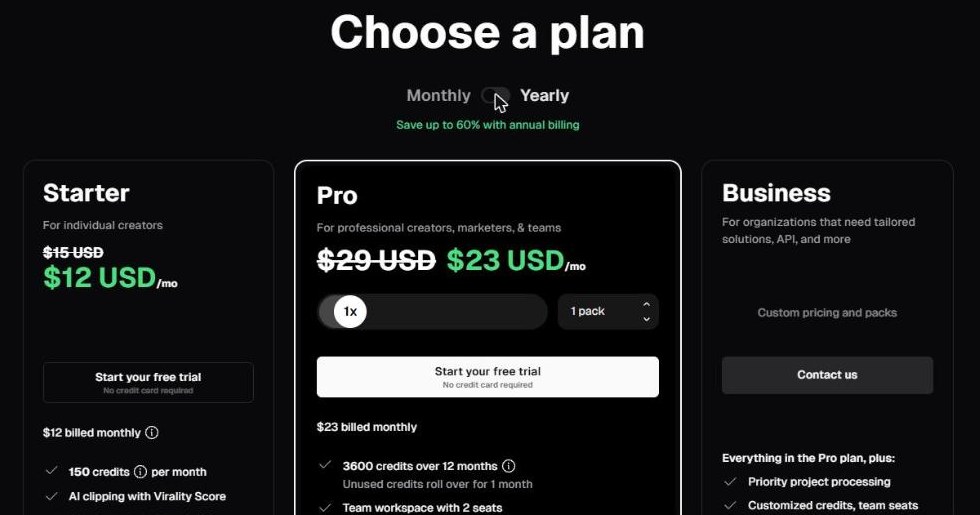
On Klap, every short it generates counts as one clip, and source videos up to 3 hours don’t use up anything else. On OpusClip, clipping costs 1 credit per minute of the original video, with partial minutes rounded down. OpusClip shows its lower prices next to struck-through old ones but doesn’t say when the sale ends, so check the page before you commit to a year.
Which is cheaper for your videos?
These assume monthly billing and that you keep about 10 clips from each long video and about 5 from each short one. Your numbers will vary.
| Your month | OpusClip | Klap | Cheaper |
|---|---|---|---|
| 4 podcast episodes, 60 min each (240 min, ~40 clips) | Pro, 1 pack: $23 | Basic: $29 ($20.30 first month) | OpusClip after month one |
| 4 live streams, 3 hours each (720 min, ~40 clips) | Pro, 3 packs (900 credits): $69 | Basic: $29 | Klap |
| 30 short videos, 10 min each (300 min, ~150 clips) | Pro, 1 pack: $23 | Pro: $79 | OpusClip |
One thing to check before you buy: Klap’s homepage gives a rule of thumb of “a one-minute long video produces about 5 video clips”, and every generated clip counts. We couldn’t confirm how many clips Klap makes from a 60-minute video, so use the free video to see the count for your own content before picking a plan.
Features side by side
| Klap | OpusClip | |
|---|---|---|
| Input | YouTube link or upload, source up to 3 hours | Local files up to 10 GB (30 GB on Pro), 10+ sources on Pro |
| Languages | 99+ for editing and transcription | AI captions in 20+ languages |
| Reframing | Active-speaker reframe; Reframe 2 adds split-screen, screencast and gaming layouts | Auto reframe; 9:16 on Starter, 9:16, 1:1 and 16:9 on Pro |
| B-roll and editing | Editor with b-roll and hook titles, all plans | AI B-roll, Viral Hook and motion graphics on Pro |
| Virality ranking | Virality score on each clip | Virality Score on Starter and up |
| Auto-posting | TikTok, YouTube, Instagram, LinkedIn, Facebook; unlimited social accounts on every plan | Auto-post on Starter; scheduler with 6 social accounts on Pro |
| Watermark | None on paid plans | Free plan only |
| API | Self-serve: $0.44 per input video, $0.32 per short, $0.48 per export, plus Zapier, Make, n8n and an MCP server | Limited API on Pro; full API on Business |

Who should pick which
- Podcasters and streamers with long recordings: Klap. Source length doesn’t count, so a 3-hour stream costs the same as a 20-minute one if you keep the same number of clips.
- Creators clipping lots of short videos, or on the tightest budget: OpusClip Pro while the sale lasts.
- Trying before paying: OpusClip’s free plan lets you export with a watermark; Klap’s free video lets you preview and edit, not download.
- Posting to LinkedIn and Facebook too, or to many accounts: Klap includes unlimited social accounts on every plan.
- Starting from a script, not a recording: neither clipper is the right tool. OpusClip’s maker also runs Agent Opus, an AI video generator that turns a script, audio or brand assets into a video.
- Developers: Klap’s self-serve API with per-video pricing is easier to start with than OpusClip’s Business-tier API.
What we could not verify
Open questions, stated plainly
Clip quality. We have not run our own test yet; Klap has offered us an account, and we will add results here.
How many clips Klap makes from a long video, which decides how fast you use a plan.
When OpusClip’s sale ends. The page shows struck-through prices with no end date.
Verdict
Right now OpusClip is the cheaper way in, thanks to its sale. But Klap vs OpusClip is really about your videos. If you record long podcasts, interviews or streams, Klap’s per-clip billing wins once your uploads run past a few hours a month, and every plan includes auto-posting to five platforms with unlimited accounts. If you clip many short videos, OpusClip’s per-minute credits stretch further. Run one of your own videos through the free option first and count the clips. If you go with Klap on a monthly plan, use N4H6O83T for 30% off the first payment.
Want just the Klap numbers? See our Klap promo code and pricing guide.
Sources, read 6 November 2026: Klap pricing and FAQ, Klap homepage, OpusClip pricing, OpusClip help: how credits are consumed.
FAQ
Is Klap cheaper than OpusClip?
Not at the entry level right now. OpusClip is on sale (Pro is $23 a month, down from $29, or $11.50 a month billed yearly), while Klap Basic is $29 a month or $14.50 billed yearly. Klap gets cheaper when your source videos are long, because it counts clips made rather than minutes uploaded. With code N4H6O83T your first Klap month is 30% off.
Does the Klap code N4H6O83T work on yearly plans?
Klap’s pricing FAQ says creator codes are entered at checkout on a monthly plan; yearly billing is already 50% off and doesn’t take codes.
How does OpusClip count credits?
OpusClip’s help centre says clipping costs 1 credit per minute of the original video, with partial minutes rounded down. Pro includes 300 credits a month, and you can buy Pro in 1 to 5 packs on monthly billing ($23, $46, $69 and so on during the current sale).
Does Klap have a free plan?
Klap lets you try 1 video free with no credit card. You can preview and edit the clips, but downloading or posting needs a paid plan. OpusClip’s free plan gives 60 credits a month, with a watermark and exports that expire after 3 days.
Does Klap add a watermark?
Not on paid plans.