Murf AI for Presentations: PowerPoint, Google Slides and Canva Voiceovers, and Which Plan You Need (October 2026)
Disclosure: links to Murf on this page are referral links. If you sign up through them we may earn a commission, at no extra cost to you. Plans,.

Disclosure: links to Murf on this page are referral links. If you sign up through them we may earn a commission, at no extra cost to you. Plans, prices and integration details were read off Murf’s pricing page, its Google Slides integration page and its PowerPoint plugin help article on 25 October 2026.
Here is our Murf AI for Presentations guide: what it is, what it costs and who should use it. Recording your own voice over 30 slides takes an afternoon, and one wrong word means doing a slide again. Murf does the narration for you, inside the tools most people already build decks in: PowerPoint, Google Slides and Canva. Here is what each add-on does, which Murf plan you need for it, and how far the included voice time goes for a presentation or a full course.
The short version
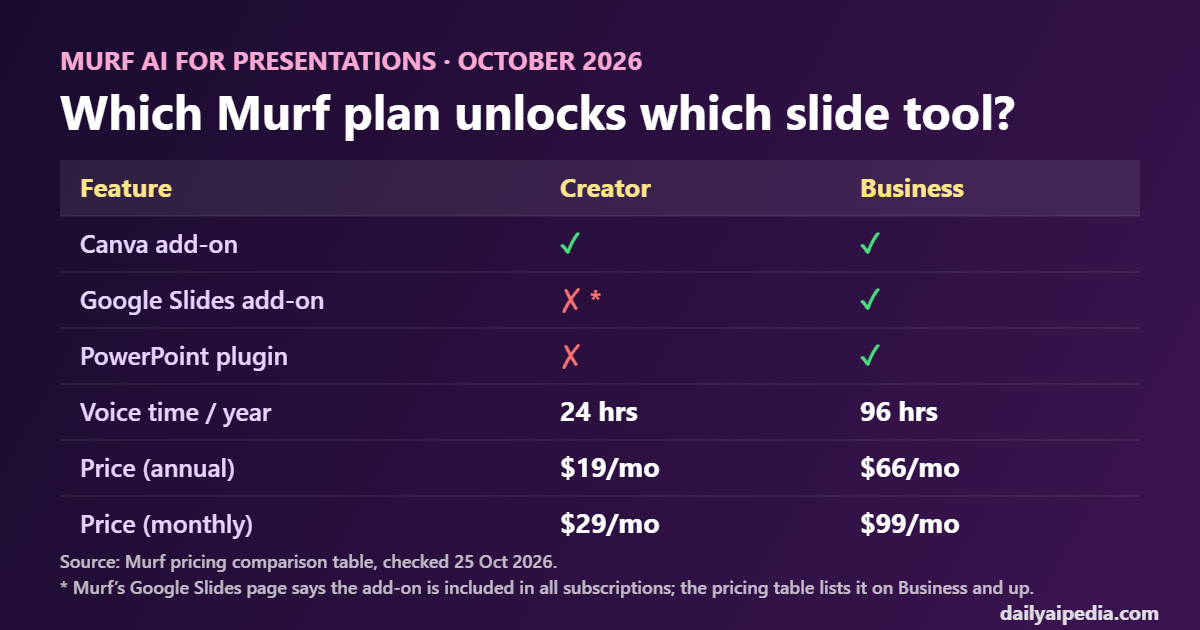
Canva users: the Canva add-on is on every plan, so Creator at $19 a month (annual) is enough.
PowerPoint users: the PowerPoint plugin is listed on Business ($66 a month annual, $99 monthly).
Google Slides users: Murf’s two pages disagree. The integration page says “included in all Murf subscriptions”, the pricing table says Business and up. Check with Murf before you pick Creator only for Slides.
Voice time: Creator gives 24 hours a year, Business 96 hours. A 20-slide deck at about a minute per slide uses around 20 minutes.
Murf in PowerPoint
Murf’s PowerPoint plugin lives inside PowerPoint. According to Murf’s help article, it can turn your speaker notes into narration, or you can type new text, choose a voice, preview it and use Add to slide to drop the audio onto the current slide. That makes it a good fit if you already write speaker notes: the script is already done.
- Best for: sales decks, internal training, conference talks you want to share as a recording.
- Plan: Business and up on Murf’s pricing table.
- Install: from Murf’s PowerPoint integration page.
Murf in Google Slides
The Google Slides add-on goes a step further than voiceover. Murf’s integration page says it can write a script for each slide, sync the timing of each slide to its audio automatically, and build a video of the whole deck. Projects are saved to Murf Studio, so you can come back and change a line later.
- Best for: teachers and course creators who want a narrated video, not just a deck.
- Plan: the integration page says “No additional cost. Included in all Murf subscriptions”. The pricing table lists Google Slides on Business and up. We could not confirm which is current.
Murf in Canva
The Canva add-on is the one that is clearly on every plan. You generate the voiceover from inside Canva and add it to your design, which works well for short narrated slides, social carousels exported as video, and presentation videos. We covered the launch in Murf Reader and the Canva integration.
Which Murf plan do you need?
| Plan | Price | Voice time | Slide tools (pricing table) |
|---|---|---|---|
| Free | $0 | 10 min, no downloads | For testing voices only, no commercial rights |
| Creator | $19/mo annual or $29 monthly | 24 hrs/year (2 hrs/month) | Canva |
| Business | $66/mo annual or $99 monthly | 96 hrs/year (8 hrs/month) | Canva, Google Slides, PowerPoint |
See every plan on Murf’s pricing page, or our full breakdown in Murf AI pricing, worked out per minute.
How much voice time does a presentation use?
Narration runs at roughly 130 to 150 words a minute. A rough guide:
- A 20-slide pitch or class deck with about a minute per slide: around 20 minutes. Creator covers that many times over.
- A 10-module online course at 15 minutes per module: around 150 minutes, or 2.5 hours. Still inside Creator’s 24 hours a year.
- A training team narrating a few decks every week: this is where Business’s 96 hours a year and the PowerPoint plugin start to matter.
Regenerating a slide after a script edit uses voice time again, so it is worth finalising the script before you generate.
A simple workflow that works
- Write the script in your speaker notes, one short paragraph per slide.
- Pick one voice and keep it for the whole deck or course.
- Generate slide by slide and listen back. Fix pronunciation of product names before you move on.
- Export the deck as a video (Google Slides add-on or Canva), or present it with audio in PowerPoint.
New to Murf’s editor? Our Murf Studio voiceover tutorial walks through it step by step.
What we could not verify
- Google Slides on Creator. Murf’s Google Slides page says the add-on is included in all subscriptions, while the pricing comparison table lists it on Business and up. We will update this page when Murf clarifies.
- Exact voice-time use per slide. It depends on your script length and how often you regenerate.
Our take
If you build in Canva, Murf Creator is the cheapest way to get clean, consistent narration on slides, and 24 hours a year is plenty for most courses. If your team lives in PowerPoint, budget for Business. And if you are comparing voices before you commit, our Murf vs ElevenLabs cost-per-minute comparison shows where each one is cheaper.
Try Murf for your presentations →
Murf AI for Presentations: FAQ
Can Murf add a voiceover to PowerPoint?
Yes. Murf’s PowerPoint plugin creates narration from your speaker notes or from new text and adds the audio to the slide. Murf’s pricing comparison table lists the PowerPoint plugin on the Business plan and up.
Is the Murf Google Slides add-on free?
Murf’s Google Slides integration page says the add-on has no additional cost and is included in all Murf subscriptions. Its pricing comparison table, checked on 25 October 2026, lists Google Slides on Business and up, so confirm with Murf before you buy Creator just for Slides.
Does Murf work with Canva?
Yes. Murf’s pricing table lists the Canva add-on on every plan, including Creator.
Which Murf plan is best for an online course?
Creator on annual billing ($19 a month) includes 24 hours of voice a year, which is enough for many courses. Business ($66 a month annual) adds 96 hours a year and the PowerPoint and Google Slides add-ons according to the pricing table.
Can I use Murf’s free plan for a presentation?
Only to test voices. The free plan includes 10 minutes of voice generation with no downloads and no commercial rights.