Wispr Flow Notetaker Review 2026: Bot-Free Meeting Notes, What the Free Plan Covers, and the Consent Catch
Disclosure: links to Wispr Flow on this page are referral links. If you sign up through them we may earn a commission, at no extra cost to you..
Disclosure: links to Wispr Flow on this page are referral links. If you sign up through them we may earn a commission, at no extra cost to you. Every date, figure and price below was read off Wispr Flow’s own Notetaker, pricing and changelog pages on 19 October 2026. We have not run our own test meetings for this piece.
Most AI meeting assistants work by sending a bot into your call. It shows up in the participant list, everyone sees it, and some clients ask you to remove it. Wispr Flow Notetaker takes the other route: it listens to the audio on your own computer, so nothing joins the meeting at all.
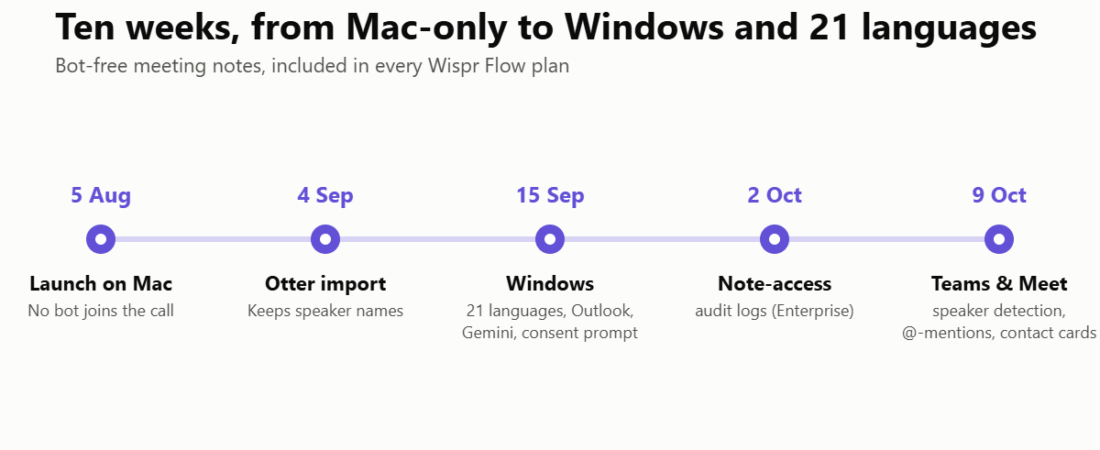
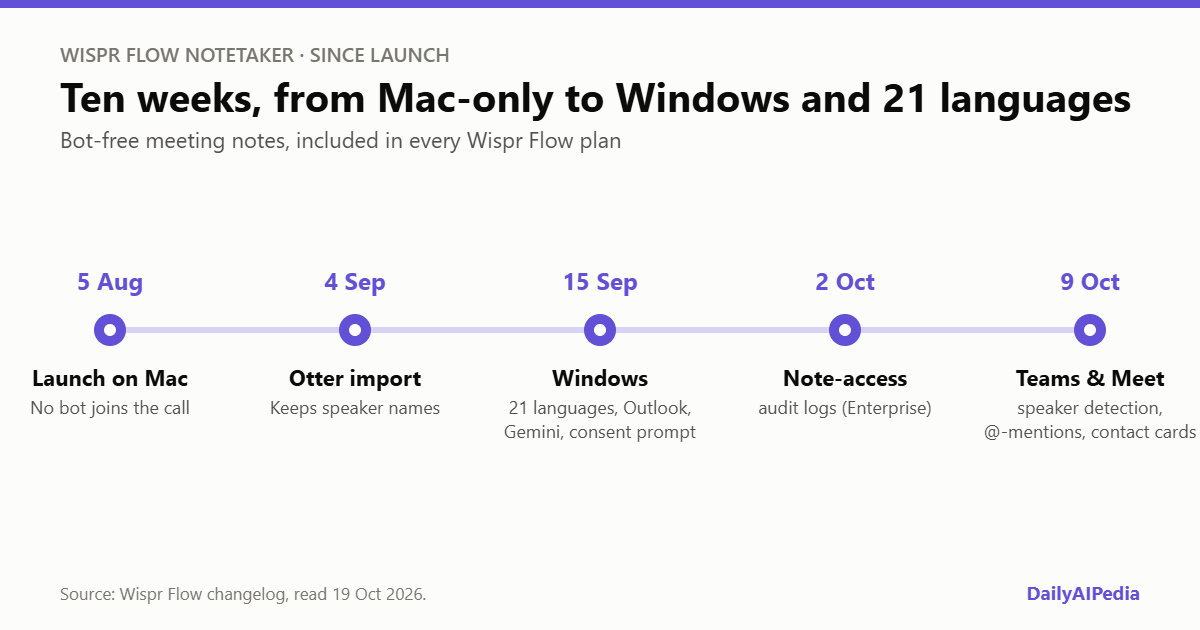
Notetaker launched on 5 August 2026 as Wispr’s first product beyond dictation, and it has changed a lot in ten weeks — Windows support, 21 languages, Outlook calendars, Otter imports, and in October, better speaker detection for Teams and Google Meet. It is included in every Wispr Flow plan, including the free one. This review covers what it does, what the free plan really gets you, and the responsibility that comes with a notetaker nobody can see.
The short version
How it records: from your computer’s audio, with no bot in the call. Works with Zoom, Google Meet, Teams, Slack huddles, Discord, browser calls and in-person meetings through your laptop mic.
What you get: a live transcript, a second AI pass that cleans it up, named speakers, summaries organised by topic, action items, “What did I miss?” catch-ups and search across every past meeting.
Price: included in Wispr Flow. Free has a weekly meeting cap; Pro is $15 a month or $12 on annual billing.
The catch: participants are not notified automatically. Telling them is on you.
How Notetaker works
Notetaker runs inside the Wispr Flow desktop app on Mac and Windows. Because it captures the audio your computer is already playing, it works with any meeting app — Wispr names Zoom, Google Meet, Microsoft Teams, Slack huddles, Discord and browser-based calls — and with in-person meetings through your laptop microphone. Mobile is on the roadmap but not available yet.
Calendar meetings start with a click. For calls that are not on your calendar, Notetaker detects the call and asks whether to take notes; Wispr names Meet, Zoom, Teams, WhatsApp and FaceTime. Since 15 September it reads both Google Calendar and Outlook.
The transcription is where Wispr’s dictation background shows. Notetaker uses your personal Flow dictionary and your calendar to spell names and jargon correctly, and after the meeting a second AI pass re-reads the full recording to fix mistakes before the summary is written. If you already dictate with Flow and have built up a dictionary, your meeting notes inherit it.
What you get after a meeting
| Feature | What it does |
|---|---|
| Live transcript | Separates you from everyone else while the call is running |
| Final transcript | Second AI pass for accuracy, with full names on speakers taken from calendar invites, your dictionary and context |
| Summary | Organised by topic, pulling out timelines, decisions and next steps |
| Action items | Who owes what, which can be sent to other tools through integrations |
| “What did I miss?” | Recaps the last few minutes during a live call |
| Ask anything | Searches your past meeting notes and the web, with answers linked to their source |
| AI connections | Claude, ChatGPT, Gemini and other MCP-compatible tools can read your meeting notes |
| Imports | Brings in your history from Granola or Otter (Otter imports keep speaker names) |
Speaker naming is the area Wispr has been working on most visibly. On 9 October it added speaker detection for Microsoft Teams gallery view and for people presenting in Google Meet. If a speaker is labelled wrongly, you can assign the right name once and it applies across the whole transcript. The same update added @-mentions inside notes and contact cards when you hover over a name.
What the free plan really includes
Notetaker is part of Wispr Flow rather than a separate product, so the plan you have for dictation is the plan you have for meetings.
| Plan | Price | Notetaker |
|---|---|---|
| Free | $0 | “Limited Notetaker access”: a set number of meeting notes each week |
| Pro | $15/month, or $12/month billed annually | Higher meeting limits and longer Notetaker history |
| Growth | $23/month per user, or $18 billed annually | Team plan with SSO and HIPAA options; unlimited Notetaker is listed as included on the plan card and as an add-on in the comparison table |
| Enterprise | Custom | Unlimited Notetaker as an add-on, audit logs, model training locked off |
Two details on the free plan are worth knowing. Recordings under five minutes do not count toward the weekly allowance, so quick check-ins are effectively free, and the count resets every week. And when you reach the cap, your existing notes are not trimmed; the hub simply warns you when you are down to your last one.
What Wispr does not say is the number. Neither the pricing page nor its free-notetaker guide states how many meetings a week the free plan covers, or how long free notes are kept. That makes the free plan easy to try but hard to plan around. If you sit in more than a handful of meetings a week, assume you will need Pro.
Teams have a time-limited bonus: workspaces that switch Notetaker on get full access until 31 October 2026, after which members move to the limited plan unless an admin upgrades them.
No bot means no notice — so tell people
The bot-free design is the reason to pick Notetaker, and also the thing to handle carefully. Wispr’s own FAQ is clear that because it records locally rather than joining as a visible participant, people on the call may not be notified automatically, and that you are responsible for telling them. Recording-consent laws differ between countries and states, and some require everyone’s permission.
A simple habit covers it: say at the start of the call that you are taking AI notes, or add a line to your calendar invites. Organisations can go further — since 15 September, admins can require a consent confirmation before recording, and they can switch Notetaker off company-wide.
Privacy and data
According to Wispr, meeting audio is encrypted and kept temporarily on your device and in some cases in secure cloud storage, then deleted automatically after a limited period. Notetaker does not create voiceprints or biometric profiles, content is never sold, and you can delete any meeting, transcript or note. Wispr says your content is not used to train its models without your consent, and there is a setting to turn training off; on Enterprise, training is locked off. Since 2 October, Enterprise admins can also see who other than the owner has opened a note or transcript, including views through anonymous share links.
How it compares
The closest rival is Granola, which also records from system audio without a bot, and Wispr clearly has it in mind — it imports Granola history and points out that its own free plan includes full AI tool access. Against bot-based tools such as Fireflies.ai and Otter, the trade is visibility for convenience: a bot can record a meeting you do not attend, while Notetaker only records what plays on your own computer. Wispr itself says Otter’s free tier is the easiest starting point if all you want is a searchable transcript.
The real advantage is for people who already use Wispr Flow for dictation: one app, one dictionary and one subscription for both talking to your computer and capturing meetings.
Who should try it
Notetaker suits consultants, freelancers and anyone who works with clients who dislike meeting bots; people who move between Zoom, Teams and Meet and want one notetaker for all of them; and existing Wispr Flow users, who get it at no extra cost. It is a weaker fit if you need a recording of meetings you cannot attend, need notes on your phone today, or need published accuracy figures before you commit.
What we could not verify
Open questions, stated plainly
- The free meeting cap. Wispr does not publish how many meetings a week the free plan covers, or how long free notes are kept.
- Transcript accuracy. No word-error or speaker-accuracy figures are published, and we have not run our own test meetings.
- Growth plan Notetaker. The pricing page lists unlimited Notetaker as included on the Growth card but as an add-on in the comparison table.
- Audio retention period. Wispr says audio is deleted after “a limited period” without giving a number.
Verdict
Wispr Flow Notetaker is one of the most convincing bot-free meeting assistants available, and the pace of its updates since August suggests Wispr is serious about it. Clean transcripts that use your own dictionary, named speakers, topic summaries and AI search across every meeting are all in the free plan, and Pro at $12–15 a month covers both meetings and dictation.
Go in with two things in mind. The free plan’s weekly limit is unpublished, so heavy meeting schedules will push you to Pro. And because nobody sees a bot, making sure everyone knows they are being recorded is your job. Try Wispr Notetaker free on your next few meetings and judge the notes for yourself.
All features, prices and dates above were read off Wispr Flow’s own Notetaker page, pricing page, free-notetaker guide and changelog on 19 October 2026. Links to Wispr Flow are referral links. If prices or limits change materially, this post gets a dated update box rather than a silent edit.
Frequently asked questions
Does Wispr Flow Notetaker join meetings as a bot?
No. Notetaker records the audio on your own computer, so nothing joins the call or appears in the participant list. Because of that, participants are not notified automatically, and Wispr says it is your responsibility to tell them.
Is Wispr Flow Notetaker free?
Yes, with limits. Notetaker is included in Wispr Flow’s free plan with a weekly meeting allowance that Wispr does not publish. Recordings under five minutes do not count. Pro, at $15 a month or $12 billed annually, raises the limits and keeps a longer history.
Which meeting apps does Wispr Notetaker work with?
Any app whose audio your computer plays, including Zoom, Google Meet, Microsoft Teams, Slack huddles, Discord and browser-based calls. It can also take notes in person through your laptop microphone.
Does Wispr Notetaker work on Windows?
Yes. It launched on Mac on 5 August 2026 and on Windows on 15 September 2026. A mobile version is on the roadmap but not yet available.
How many languages does Wispr Notetaker support?
Transcription supports 21 languages, including English, Spanish, French, German, Japanese, Chinese, Hindi and Arabic. Wispr says more are coming and that other languages may give mixed results.