Fireflies Talk vs Wispr Flow (2026): Free Unlimited Dictation vs 2,000 Words a Week
Disclosure: this post contains affiliate links to Fireflies.ai and Wispr Flow. If you sign up through them we may earn a commission at no extra cost to you..

On 29 September 2026 Fireflies.ai launched Fireflies Talk, bolting voice dictation onto its desktop apps and giving it away free and unlimited on every plan, including the free one. Twelve days earlier, on 17 September, Wispr Flow shipped Canto, the first speech model it built in-house, to every user with nothing to switch on.
Two companies that started in different places — Fireflies from meeting notes, Wispr from dictation — have arrived at the same product: a key you hold down to talk into any text box on your computer. The interesting part is not the feature. It is that one of them now gives it away without a cap and the other does not.
The one number that decides most of this
Both tools have a free plan. They are not comparable.
| Free plan | Dictation allowance | Where it works |
|---|---|---|
| Fireflies Talk | Unlimited. No word, minute or daily cap is published anywhere. | Mac and Windows desktop only. Mobile is listed as “coming soon”. |
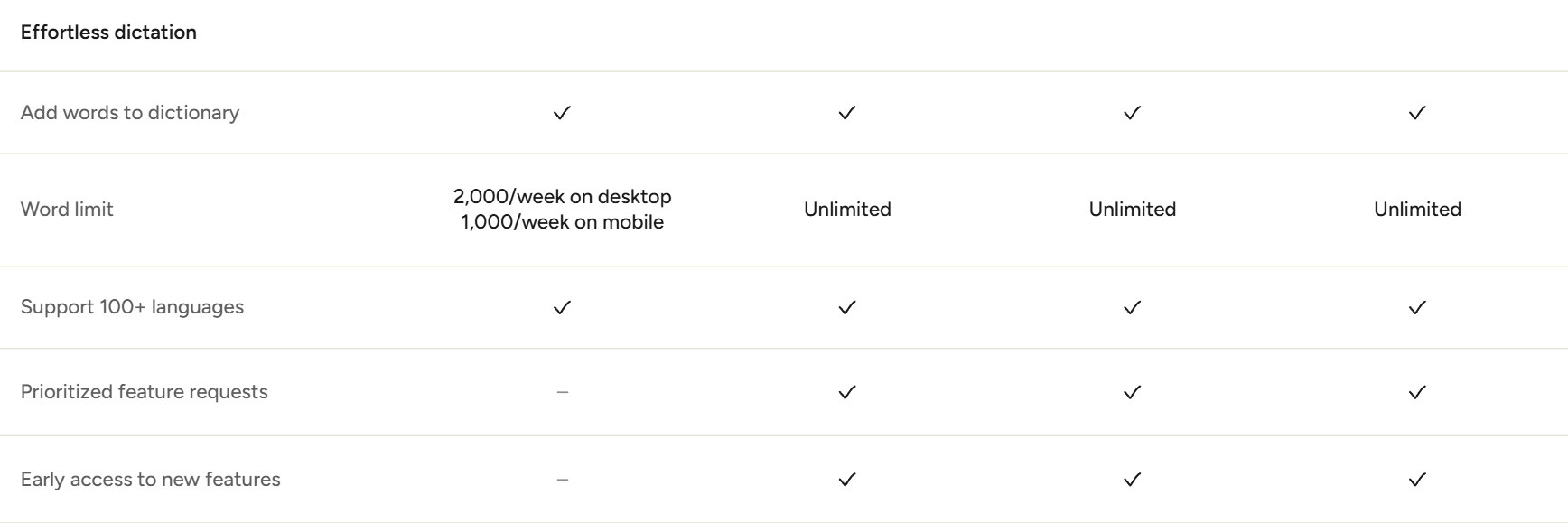
| Wispr Flow | 2,000 words per week on desktop, 1,000 per week on mobile. | Mac, Windows, iPhone and Android. |
Two thousand words a week is roughly fifteen minutes of talking. If you dictate for a living you will hit it on a Tuesday. That single line is why this comparison exists at all, and it is worth being precise about what it does and does not mean: Fireflies is unlimited on the surface you are probably sitting at, and absent on the one in your pocket.
What Fireflies Talk actually does
You hold a key, speak, and the text lands wherever your cursor is — an email, a Slack message, a CRM field, a prompt box. On a Mac the key is Fn; on Windows it is Ctrl + Win. Filler words and false starts are stripped out, and the formatting adapts to the app you are writing in, so an email comes out in paragraphs and a Slack message does not.
The one trick nobody else has
- Say a teammate’s name in Slack and Fireflies turns it into a real @mention, not just their name as text.
- 90+ languages for dictation (note: Fireflies’ meeting transcription claims 100+ — they are different numbers for different products).
- Included on every plan, so the free tier is a genuine entry point rather than a trial.
On privacy, Fireflies says dictations are stored on your device, that it does not keep a copy, and that nobody at Fireflies or in your workspace can see them; it also claims SOC 2 Type II and GDPR compliance and says dictations are never used to train models. Read that carefully, because it is a claim about storage, not processing. No Fireflies page says the speech model runs locally on your machine, and we would not assume it does.
One loose end worth flagging: the press release says Mac and Windows with mobile coming soon, while the Fireflies Talk product page lists iOS, Android and a Chrome extension. Those appear to describe the wider Fireflies product family rather than Talk. Until Fireflies resolves it, treat dictation as desktop-only.
What Wispr Flow has that Fireflies does not
Wispr has been doing only this for longer, and it shows in the edges.
Wispr-only features
- Phones. Dictation on iPhone and Android, not just desktop.
- Per-app tone. Set a different writing style for work chats, emails and messages.
- Custom dictionary and snippets. It learns names and jargon, and you can save boilerplate you trigger by voice.
- 100+ languages with automatic language detection mid-sentence.
- Its own speech model. Fireflies publishes no model name or accuracy claim for Talk at all.
About that Canto accuracy claim
Wispr says Canto beat every model it tested — including Google, OpenAI, AssemblyAI and Deepgram — on 9.8 hours of real-world Flow recordings from more than 2,300 speakers. On a harder three-hour set of noisy, whispered and far-field audio it placed second behind Gemini 3.1 Pro overall, but first among real-time models. On LibriSpeech it tied for the lowest word error rate.
Here is the part most write-ups leave out: Wispr has not published a single word-error-rate number. Every claim is relative — “lowest of the models we tested” — with no percentages, no per-model table and no released test set. The evaluation set is drawn from Wispr’s own users’ recordings, which is exactly the audio its model was built for. We found no independent testing of Canto from any source we would cite. None of that makes the claim false. It makes it unverifiable, and you should weigh it accordingly.
Pricing, side by side
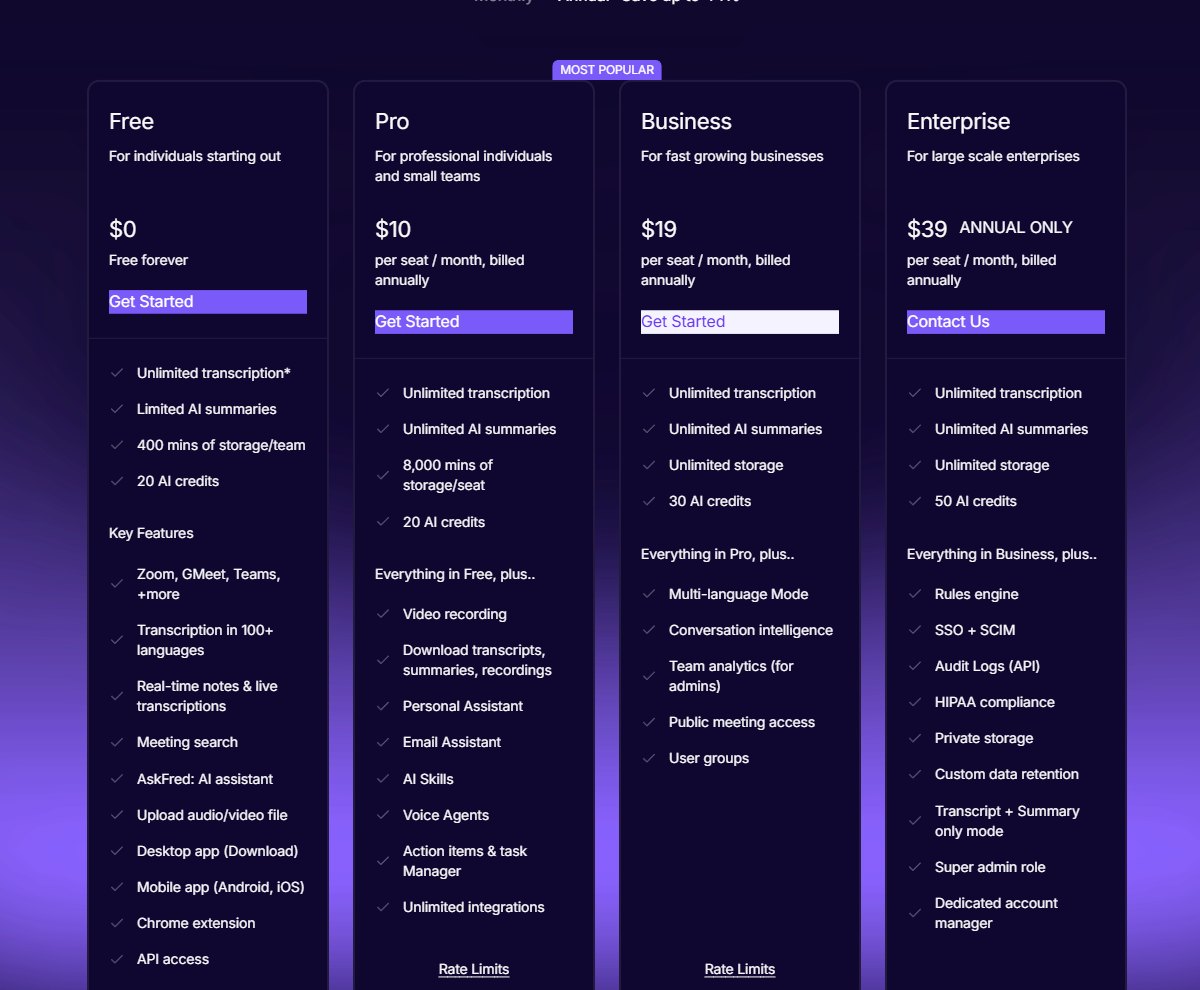
All Fireflies tiers advertise unlimited transcription; the differences are storage, AI credits and features. Wispr’s tiers differ mainly on the word cap, team admin and Notetaker history.
Fireflies.ai
| Plan | Monthly | Annual (per month) | Storage | AI credits |
|---|---|---|---|---|
| Free | $0 | $0 | 400 mins | 20 |
| Pro | $18 / seat | $10 / seat | 8,000 mins / seat | 20 |
| Business | $29 / seat | $19 / seat | Unlimited | 30 |
| Enterprise | Annual only | $39 / seat | Unlimited | 50 |
Fireflies’ own pricing page says Free storage is “400 mins/team” while its help-centre article says 400 minutes per seat. The vendor contradicts itself; we have not been able to establish which is current. The page also carries an asterisk on “Unlimited transcription” for the Free plan without an adjacent footnote. Neither matters for dictation, but both matter if you also want the meeting notetaker.
Wispr Flow
| Plan | Monthly | Annual (per month) | Annual total | Dictation |
|---|---|---|---|---|
| Free | $0 | $0 | — | 2,000 words/week desktop, 1,000/week mobile |
| Pro | $15 / user | $12 / user | $144 | Unlimited |
| Growth | $23 / user | $18 / user | $216 | Unlimited |
| Enterprise | Custom | Custom | — | Unlimited |
Wispr states prices in USD and describes annual billing as a 20% discount; there is no seat minimum on Pro or Growth. Fireflies’ pricing page shows no currency label and no note about regional pricing or tax, so we are not asserting a currency for it.
So which one
Pick Fireflies Talk if
- You dictate heavily and do not want to pay — unlimited free is the whole argument.
- You live in Slack and the automatic @mention conversion would actually save you time.
- You already use, or would use, Fireflies for meeting notes; it is one subscription.
Pick Wispr Flow if
- You dictate on your phone. This is not a close call — Fireflies cannot do it yet.
- You need a custom dictionary for names, drug names, product SKUs or jargon.
- You want different writing styles per app, or saved snippets triggered by voice.
If you are undecided, the honest move is to install both. Fireflies Talk costs nothing to keep permanently, and Wispr’s free tier is enough to tell you within a week whether its accuracy and phone support are worth $12–$15 a month to you. Start with Fireflies for the desktop, add Wispr Flow if you dictate away from your desk.
What we could not verify
Open questions
- Whether either free plan requires a credit card at signup — neither pricing page says, and we did not create accounts.
- Any character, minute or device limit on Fireflies Talk. None is published, which is not the same as confirmed to be none.
- The currency on Fireflies’ pricing page, and whether either vendor varies prices by region.
- Actual word-error-rate figures for Canto, or any independent evaluation of it.
- Which of the 100+ Wispr languages Canto itself covers, versus a fallback model.
Check both for yourself before you commit: the Fireflies pricing page and Wispr Flow’s plans. We will update this post as those are answered. If you have tested either tool at volume, tell us what you found — first-hand numbers beat vendor claims every time.