Wispr Flow’s Canto Model and Notetaker on Windows: What Changed in September 2026
Disclosure: links to Wispr Flow on this page are referral links. If you sign up through them we may earn a commission, at no extra cost to you..
Disclosure: links to Wispr Flow on this page are referral links. If you sign up through them we may earn a commission, at no extra cost to you. Every date, figure and price below was read off Wispr Flow’s own changelog and pricing page on 26 September 2026.
Wispr Flow spent September doing two things at once: replacing the speech recognition underneath its dictation with a model it built itself, and turning Notetaker from a Mac-only side feature into something a whole team can use. Both matter if you dictate for a living. Here is what shipped, in order, and what it changes.
The short version
Canto (17 September): Flow now runs on Wispr’s own speech model, built for noisy real rooms rather than quiet recording booths. It is live for everyone with nothing to switch on.
Notetaker on Windows (15 September): meeting notes in 21 languages, Outlook calendars, Gemini alongside Claude and ChatGPT, and MCP connections so other AI tools can read your meeting context.
Growth plans (28 August): a self-serve tier between individual and enterprise, at $23 a month per user or $18 on annual billing.
Still free to try: the free plan dictates in 100+ languages, with weekly word limits.
Canto: Wispr’s own speech model
Until this month, Flow ran on third-party speech recognition. Canto, announced on 17 September, is the company’s first in-house model, and the reasoning behind it is the most interesting part. Wispr argues that most speech models are trained and measured on clean audio recorded in quiet rooms with good microphones — which is not where dictation actually happens. People dictate on trains, in open-plan offices, walking between meetings, or muttering so they do not disturb anyone. Canto was built and measured against that instead.
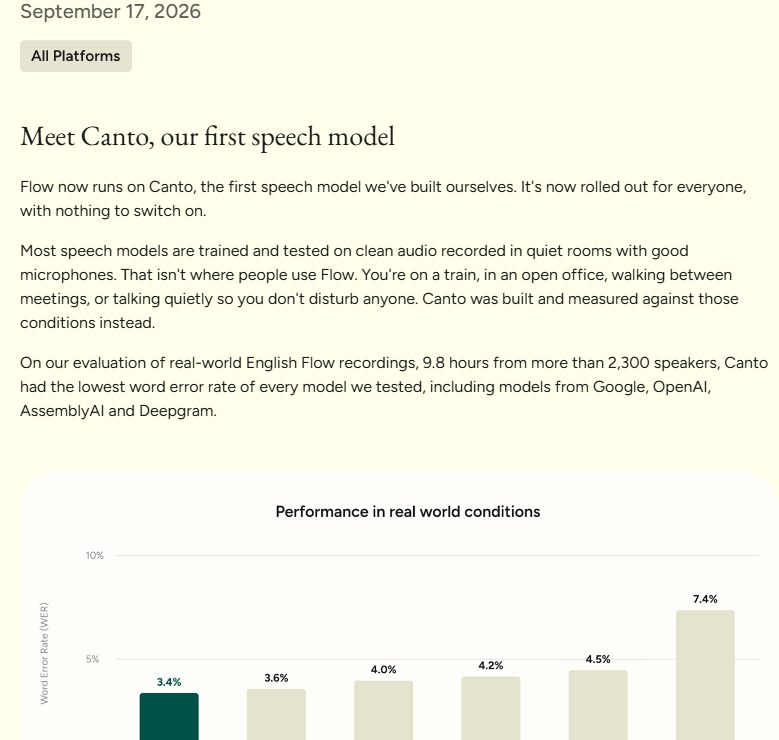
The evidence Wispr published is a word-error-rate comparison across 9.8 hours of real Flow recordings from more than 2,300 speakers:
| Model | Word error rate |
|---|---|
| Wispr Canto | 3.4% |
| Google Gemini 3.1 Pro | 3.6% |
| OpenAI GPT Transcribe | 4.0% |
| AssemblyAI Universal-3.5 Pro | 4.2% |
| Google Gemini 3.5 Transcribe | 4.5% |
| Deepgram Nova-3 | 7.4% |
Two caveats worth stating plainly. This is the vendor’s own benchmark, run on its own data, and the gap at the top is two-tenths of a percentage point — close enough that on your accent, your microphone and your jargon the order could easily change. What the numbers do support is the weaker, more useful claim: Canto is at least competitive with the big general-purpose models on messy audio, while being tuned for one job.
In practice you do not choose Canto. It replaced what was there, on every platform, with nothing to enable.
Notetaker grows up
Notetaker records and summarises meetings. Until 15 September it ran only on Mac, which made it hard to standardise on across a team. The Windows release came bundled with most of what was missing:
- 21 languages for meeting transcription, adding Spanish, French, German, Chinese, Japanese, Hindi and Arabic.
- Outlook calendar support, alongside Google Calendar.
- Gemini as a one-click destination for meeting notes, joining Claude and ChatGPT.
- MCP connections, so other AI tools can pull meeting context rather than you pasting transcripts between apps.
- Otter.ai transcript import, with speaker names preserved — a deliberate migration path, and it arrived first on desktop on 4 September.
- Admin controls over who can use Notetaker, what gets shared, and organisation-wide privacy settings.
The same early-September release added org-wide and department-level dictionary sharing, which is the unglamorous feature that makes dictation work in a company: product names, client names and internal acronyms get spelled correctly for everyone, not just for whoever added them.
What Wispr Flow costs now
| Plan | Monthly | Annual (per month) | What you get |
|---|---|---|---|
| Free | $0 | $0 | Dictation in 100+ languages across Mac, Windows, iOS and Android, with weekly word limits and limited Notetaker |
| Pro | $15 per user | $12 per user | Unlimited dictation, longer Notetaker history, shared dictionary and snippets, team workspace, priority support |
| Growth | $23 per user | $18 per user | Everything in Pro plus SSO and SAML, HIPAA enforcement with a BAA, admin control over model training, per-user usage reporting |
| Enterprise | Custom | Annual only | Adds free IT admin seats, SCIM provisioning, audit logs, MDM, domain capture and SLAs |
Growth is the new part, self-serve since 28 August. It is aimed squarely at the company that is too big to hand out individual Pro seats but does not want an enterprise contract — the interesting inclusion being admin control over model training, which used to require talking to sales. If you handle client or patient data, the HIPAA enforcement and BAA sit on this tier too.
Prices read from Wispr Flow’s pricing page on 26 September 2026. Annual billing is a 20% discount.
Everything else from the last month
| Date | Release | What it adds |
|---|---|---|
| 17 Sep | Canto | Wispr’s own speech model, all platforms |
| 15 Sep | Notetaker on Windows | 21 languages, Outlook, Gemini, MCP, admin controls |
| 4 Sep | Desktop v1.6.721 | Otter transcript import, shared dictionaries, updates deferred until you stop working |
| 28 Aug | Desktop v1.6.675 | Self-serve Growth plans, org-wide Notetaker toggle for admins |
| 21 Aug | Desktop v1.6.580 | Virtual microphone support for Krisp, NVIDIA Broadcast, BlackHole and VDI; 14-day trials for new team members |
The virtual microphone support is a small note with a real consequence: if your headset runs through Krisp or NVIDIA Broadcast, or you work inside a virtual desktop, Flow can now hear you properly.
Does this change who should use it?
If you already dictate, nothing here asks anything of you — Canto arrived on its own and should be slightly more accurate in the places you actually work. If you dismissed Wispr Flow before because Notetaker was Mac-only or because there was no plan between personal and enterprise, both of those objections closed this month.
If you have never tried dictating, the honest test is a week on the free plan with your own vocabulary loaded into the dictionary. Speech tools live or die on proper nouns, and no benchmark will tell you how one handles yours.
The verdict
Building your own speech model is expensive, and Wispr has published a result that justifies it rather than just announcing it. Paired with Notetaker finally reaching Windows and a mid-tier plan that includes training controls, September makes Wispr Flow a far easier tool to roll out across a team than it was in August.
You can try it on the free plan through our Wispr Flow link. For how it compares with the rest of the category, see our Wispr Flow review and the AI Voice Pricing Tracker.
Release dates, version numbers, the word-error-rate figures and all prices verified against Wispr Flow’s changelog and pricing page on 26 September 2026. The benchmark is Wispr’s own; we have not independently reproduced it.
Related guides
- AI Voice Tool Pricing Tracker: 16 Tools, Verified Every Month
- AI Voice Tool Picker: Answer 5 Questions, Get the Right Tool
- ElevenLabs September 2026 Updates: Music v2.5, Call Queueing and Scribe v2 Medical
- Wispr Flow Review 2026: AI Voice Dictation, Notetaker, Pricing and Features
- Wispr Flow Review 2026: AI Voice Dictation, Notetaker, Pricing and Features
- Fireflies Voice Agents: AI That Runs Your Calls, and the Hiring Rules That Come With It
- Gemini 3.8 TTS Is the Cheapest Studio-Grade Voice Right Now — and It Doubles on 1 January
- Fireflies Talk vs Wispr Flow: free unlimited dictation vs 2,000 words a week