How Kerbrank Measures Local Visibility — and the One Metric That Flatters Every Business
How this piece came about: Kerbrank submitted its tool to DailyAIPedia for editorial consideration. Not sponsored, not paid for, and we hold no affiliate link — outbound links.

How this piece came about: Kerbrank submitted its tool to DailyAIPedia for editorial consideration. Not sponsored, not paid for, and we hold no affiliate link — outbound links are unpaid and marked nofollow. Everything below is quoted or summarised from Kerbrank’s own published methodology page, which it dates 27 September 2026, read by us on 12 October 2026. We have not run a live scan.
Most local rank trackers tell you what they found. Very few tell you how they looked. Kerbrank publishes an 8-minute methodology page that walks through every step of a scan, defines each number it reports, and — unusually — names the metric in its own product that makes customers look better than they are.
That makes it worth reading even if you never buy it, because the questions it answers are the questions to put to any tool in this category. This is a companion to our Kerbrank review, which covers pricing and plan limits. Here we are only interested in the method.
The rule Kerbrank puts at the top is the one to hold onto: “If we could not measure something, the report says so. It never fills the gap with a guess.”
One scan, in six steps
| Step | What happens |
|---|---|
| 1. Build the grid | Centred on the premises. Points with no postcode nearby — sea, harbour, open land — are left out. |
| 2. Search Google Maps | From every point, for every search, at a fixed zoom. |
| 3. Read the top 20 | Matched on Google’s own business ID where available, otherwise on name. |
| 4. Score it | Top-three share, average position, top-ten coverage, blind spots. |
| 5. Ask ChatGPT, check the site | Each question three times. The website read as it is. |
| 6. Write the to-do list | Ranked by severity, then effect against effort. |
Scans run every seven days and Kerbrank shows an estimated scan time before you start. Step 3 answers a question we left open in our review: a reading is one grid point, for one search, reading 20 results. So the weekly “map checks” allowance on each plan is points multiplied by searches, which is how we had assumed it worked.
The grid is squarer than you would expect
Grids are square with an odd number of points per side, so the business always sits in the middle, and run from 3 × 3 up to 15 × 15 depending on plan. That lower bound matters commercially: because the weekly allowance is points times searches, dropping to a smaller grid is how you buy more search terms within the same cap.
Spacing is offered in four brackets, sized for British geography rather than American suburbs:
| Bracket | Spacing | Intended for |
|---|---|---|
| Neighbourhood | 250 m | A walk-in shop or café |
| Local | 500 m | Most clinics, salons and trades |
| Whole town | 1 km | Customers driving in from across town |
| Region | 2.5 km | Mobile trades covering a county |
Two details here are better engineering than this category usually bothers with. Map zoom is fixed per spacing bracket and stored with every scan, so week-to-week comparisons are like-for-like rather than drifting as the tool changes. And longitude is corrected at every point for latitude, so a grid stays genuinely square whether the business is in Cornwall or Caithness — which anyone who has drawn a naive lat/long grid across the UK will recognise as a real bug avoided.
You can also draw the area yourself in a map designer as a circle, a square or a freehand outline around the streets you actually serve, in miles or kilometres, and Kerbrank states that what you see in the designer is exactly what the scan checks.
Points over water do not count against you
Before each scan, every point is checked against UK postcode data. A point with no postcode nearby — open water, a harbour, empty country — is dropped from the scan and from every score. Kerbrank’s own line is the clearest statement of why: “Nobody searches from the Solent, so nobody should be marked down for not ranking there.”
Its sample shows 52 points scanned and 29 left out, which on a coastal business is the difference between a fair score and a meaningless one. If the postcode lookup is unavailable, every point is scanned as normal — so an outage makes scores harsher, not softer, which is the right direction for a fallback to fail in.
The five numbers, and the one that lies
This is the section worth stealing for your own reporting, whichever tool you use.
| Metric | What it measures | Kerbrank’s own label |
|---|---|---|
| Top-three share | Share of grid points where the business is in the Maps top three for that search. | “The headline” |
| Average position | Average across every point, with anything outside the top 20 counted as 21. Lower is better. | “The honest one” |
| ARP | Average across only the points where the business does appear. | “Never on its own” |
| Top-ten coverage | Share of points in the top ten. Tends to move before the headline does. | “Moves first” |
| Blind spots | Groups of three or more neighbouring points with no appearance at all, named by compass direction. | — |
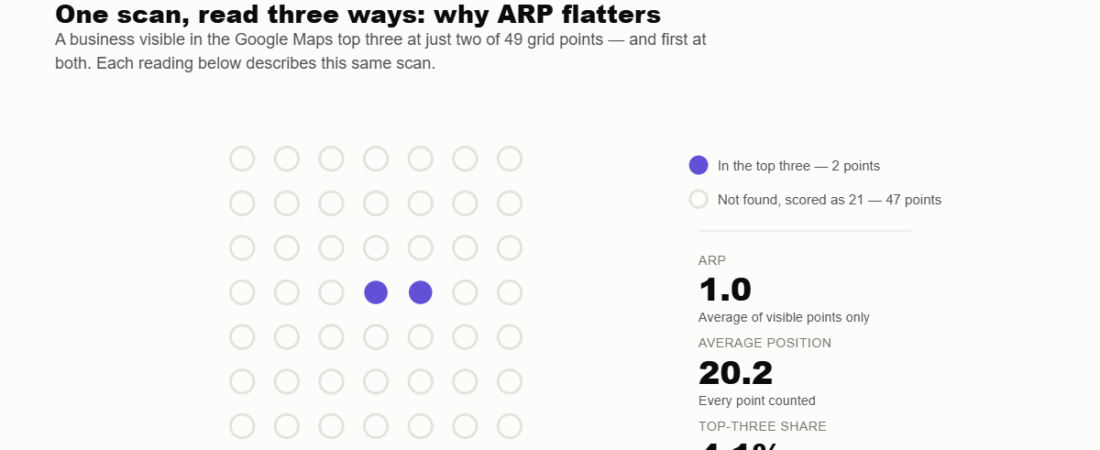
ARP — average ranking position across visible points only — is the number to distrust, and Kerbrank says so in its own documentation. Its worked example is brutal and worth memorising. One business, one scan, read three ways:
One scan, read three ways: why ARP flatters
A business visible in the Google Maps top three at just two of 49 grid points — and first at both. Each reading below describes this same scan.
Worked example published by Kerbrank on its own methodology page, read 12 October 2026. ARP is average ranking position across only the points where a business appears, which is why Kerbrank labels it “never on its own”.
| Same scan, three metrics | Result | What a client hears |
|---|---|---|
| ARP | 1.0 | “You rank first.” |
| Average position | 20.2 | “You are invisible almost everywhere.” |
| Top-three share | 4.1% | “You are in the top three on 2 points out of 49.” |
The business is visible at 2 of 49 points and happens to be first at both. ARP reports 1.0. A perfect score, from near-total invisibility. If an agency ever shows you a local report where the headline number is an average of only the places you appear, that is the number to ask about — and this table is why.
“Not found” and “no data” are different things
Kerbrank keeps two kinds of gap apart, and this is the integrity feature of the whole method:
- Not found — it looked, and the business was not in the top 20. Counts against you, as position 21.
- No data — it could not get an answer for that point. Shown as missing, and never scored as a bad ranking.
Conflating those two is the single easiest way for a rank tracker to quietly invent bad news, and the reason a week with a partial outage can look like a collapse in rankings. Ask any tool you use which bucket its gaps fall into.
The ChatGPT check, with error bars
Questions are built from the business’s category, town and services — “best plumber in Portsmouth”, “who should I call for a boiler repair near Southsea”. Because language models answer differently run to run, each question is asked three times and reported with a 95% confidence range.
So the output reads “8 of 24 answers (33%), likely between 18% and 53%” rather than a bare 33% that lurches every week. Publishing a confidence interval on an AI-visibility metric is rare and it is the correct call: with 24 samples, the honest range really is that wide, and a tool that hides it is selling precision it does not have.
Kerbrank also records which businesses were recommended instead, and which websites ChatGPT cited. It argues the second list matters more, and we agree: “if it keeps reading one directory for your trade, being missing from that directory is the real problem.” That is a more actionable finding than your own recommendation rate.
Demand, website and the to-do list
Search demand comes from Google Ads data, showing monthly local volume per tracked phrase, and Kerbrank suggests alternatives where demand is low — its example contrasts “boiler repair” at 590 a month with “plumbing and heating engineer” at 20. Being first for a phrase nobody types is the classic local-SEO vanity win.
The website check fetches the site and reads its structured data, name, phone and address, then compares them against the Google profile. If the site will not load, the report says it could not be checked rather than guessing.
The to-do list draws on the Google profile, competitors’ profiles, grid results, the website check and the ChatGPT answers, ranked by severity then effect against effort, with the report opening on one sentence and the top three jobs. Kerbrank states the effect estimates are weighted by Whitespark’s Local Search Ranking Factors survey — in which primary category, distance and being open at the time of search count for most — and that “likely effects are a guide, not a promise”.
Two further notes worth knowing: connecting Google Search Console, Business Profile or Analytics is optional and read-only, and every figure carries the date it was measured, with raw scan results retained so a newly added measure can be backfilled across your history rather than starting from zero.
Why your own search looks different
Kerbrank searches from every point as a new visitor: not signed in, no search history, the same way every week. Its explanation of why that differs from what you see is the clearest short account of Maps personalisation we have read:
Where you are standing counts most, so moving a few streets changes the order. Google also weighs what you have searched and clicked before, and whether you are signed in. And on your own phone you are usually at the premises — where most businesses rank best — on an account Google knows owns the listing. Their suggested sanity check is the right one: open a private window and search from where a customer would actually be.
What they say they do not do
The methodology page closes with three refusals, which tell you as much about a vendor as its feature list: no citation building for sale, no database of scraped personal contacts, and no automated review replies — on the grounds that “an obviously automated reply to a customer does more harm than no reply at all”.
In a category where scraped data and AI-generated review responses are routinely bundled in, declining all three is a position rather than a gap.
What we could not verify
Open questions, stated plainly
- That the method is followed as described. This is a documentation review. We have not run a scan and compared its output against the page.
- Which ChatGPT model, region or account type is used. Not stated, and all three change what the model answers — so the confidence range covers run-to-run variation, not configuration differences.
- How the 95% range is calculated. Kerbrank reports one but does not name the method, and with 24 samples the choice of interval matters.
- Which postcode dataset is used, how often it is refreshed, and what counts as “nearby” for excluding a point.
- What happens at the weekly cap. Still unanswered: nothing says whether hitting it queues, skips or shrinks the grid.
- Whether the local pack check is on by default. Kerbrank notes the three-result box on a normal Google search is measured separately, only when the mobile pack check is enabled, but not whether that is a default or an extra.
Every quotation and figure above is taken from Kerbrank’s own methodology page, which it dates 27 September 2026, read by us on 12 October 2026, with the worked examples from its labelled sample report. Kerbrank submitted this tool to DailyAIPedia and we hold no referral link for it. If the method changes materially, this post gets a dated update box rather than a silent edit.
Frequently asked questions
What is ARP in a local rank report, and why is it misleading?
ARP is the average ranking position across only the grid points where a business actually appears. It flatters, because points where the business is invisible are excluded. Kerbrank’s own example: a business visible at 2 of 49 points, first at both, scores an ARP of 1.0 while its average position is 20.2 and its top-three share is 4.1%. Never read ARP on its own.
How does Kerbrank build its grid?
A square grid with an odd number of points per side so the premises sit in the centre, from 3 by 3 up to 15 by 15 depending on plan. Spacing comes in four brackets — 250 m, 500 m, 1 km and 2.5 km — and longitude is corrected at every point for latitude so grids stay square anywhere in the UK. You can also draw a circle, square or freehand area yourself.
Does a grid point over water count against my rankings?
No. Points are checked against UK postcode data first, and any point with no postcode nearby, such as open water or empty country, is dropped from the scan and from every score. If the postcode lookup is unavailable, all points are scanned as normal.
What is the difference between “not found” and “no data”?
Not found means the tool looked and the business was not in the top 20; it counts against you as position 21. No data means it could not get an answer for that point; it is shown as missing and never scored as a bad ranking. Conflating the two lets a partial outage look like a ranking collapse.
How does Kerbrank test ChatGPT visibility?
It builds locally framed questions from the business’s category, town and services, asks each one three times, and reports how often the business was recommended with a 95% confidence range — for example 8 of 24 answers, 33%, likely between 18% and 53%. It also records which competitors were recommended instead and which websites were cited.
Why do my own Google Maps results differ from a rank tracker?
Google personalises results. Your location counts most, so moving a few streets changes the order, and it also weighs your past searches and clicks and whether you are signed in. On your own phone you are usually at the premises, where most businesses rank best, on an account Google knows owns the listing. To approximate a customer’s view, search in a private window from where they would be.