Klap vs YouTube’s Free Shorts Clipper (2026): We Tested Both on the Same Video
Disclosure: Klap links on this page are affiliate links, and N4H6O83T is our affiliate code: if you subscribe through them we may earn a commission, at no extra.
Disclosure: Klap links on this page are affiliate links, and N4H6O83T is our affiliate code: if you subscribe through them we may earn a commission, at no extra cost to you. Klap gave us a free 30-day Pro account for this test; it did not see or approve this article. YouTube Studio is free and we have no relationship with YouTube. We tested Klap on 7 November and YouTube Studio on 10 November 2026, using our own video.
Since YouTube added a free Clips and Shorts tool to YouTube Studio (it featured in YouTube’s October Creator Roundup), every paid AI clipper faces the same question: why pay when YouTube does it for free? So we ran the same video through both: our 3:43 animated Close CRM explainer. Here’s what each one actually did.
The short version
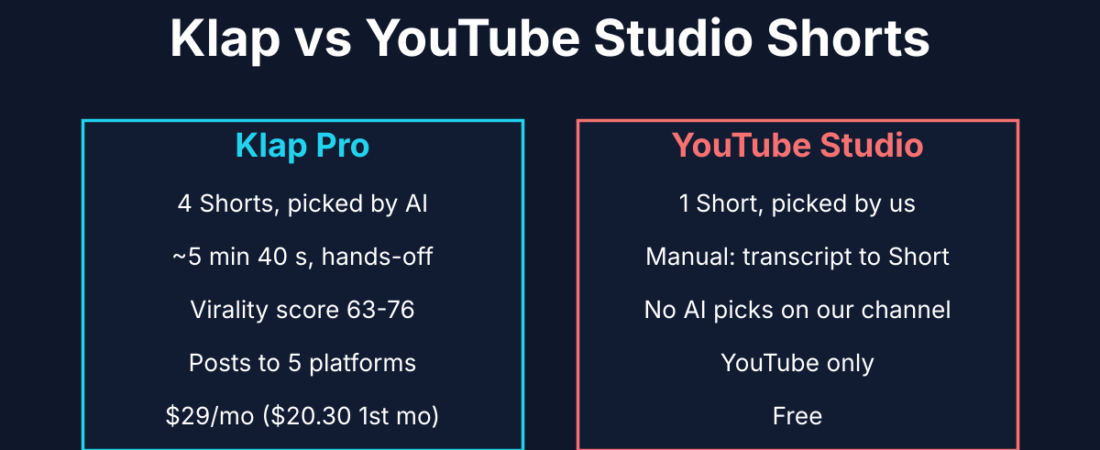
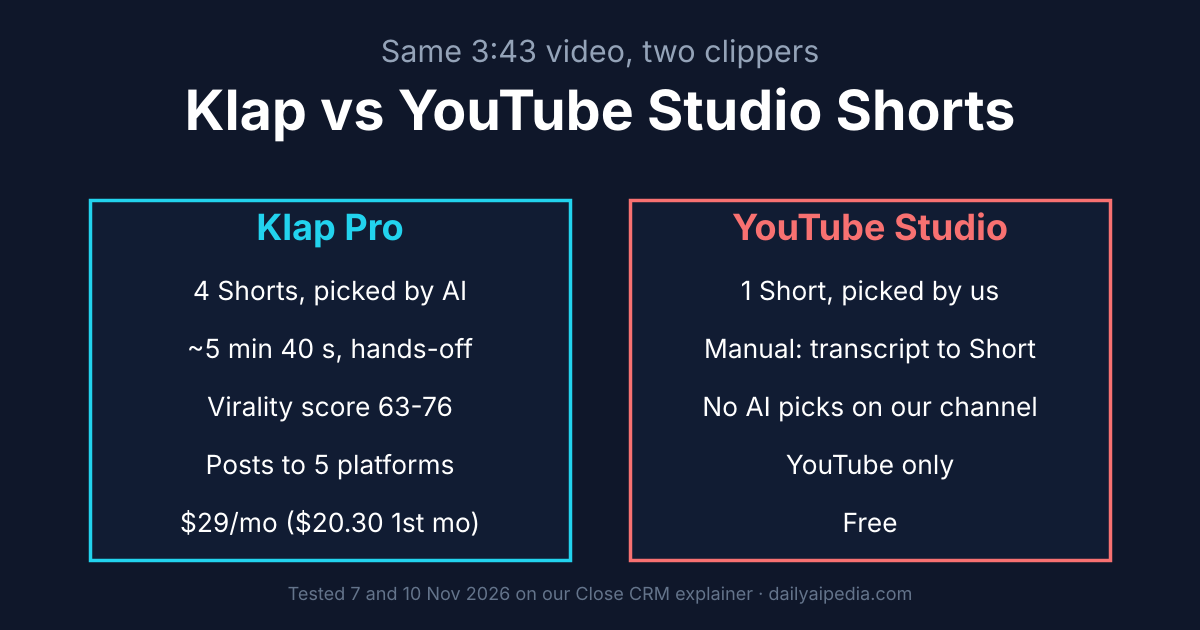
Klap: 4 Shorts chosen by AI in about 5 minutes 40 seconds, each with a hook title, captions and a virality score (63 to 76). Posts to TikTok, YouTube, Instagram, LinkedIn and Facebook. From $29 a month, or $20.30 for the first month with N4H6O83T.
YouTube Studio: free. We picked one 21-second moment from the transcript and previewed it as a vertical Short with optional captions. No AI suggestions appeared on our UAE channel, and it only publishes to YouTube.
Our pick: YouTube Studio for an occasional Short from a video you know well; Klap if you want the moments chosen for you, many Shorts a week, or the same clips on other platforms.
How we tested
- The video: our own 3:43 animated explainer about Close CRM, 16:9, with a voiceover and lots of on-screen text.
- Klap: pasted the YouTube link, kept the default caption style and auto-post off, and clicked Generate.
- YouTube Studio: Content → the video → Clips and Shorts → Create clip or Short → New Short. We stopped at the preview and did not publish.
Klap: four Shorts, no choices needed

Klap estimated “~7 shorts” and delivered four, ranked by its own virality score, in about 5 minutes 40 seconds with nothing for us to do in between:
| Klap’s title | Length | Virality score |
|---|---|---|
| Why slow follow-up kills sales leads | 0:17 | 76 |
| AI sales agent that books meetings | 0:18 | 70 |
| How Close charges for its AI agent | 0:44 | 65 |
| How Close organizes and automates follow-ups | 0:19 | 63 |

Each Short got a bold hook title above the video and animated captions below. Because our video is a text-heavy animation with no presenter, Klap kept the whole wide frame in the middle of the vertical Short rather than cropping to a face, so on-screen text ends up small on a phone. With a talking-head video, Klap’s speaker tracking would do more.
YouTube Studio: free, but you do the choosing
YouTube’s tool opens with your video’s transcript. On our channel there were no AI-suggested clips: YouTube says those are only available in certain countries and languages (Brazil, Canada, France, Germany, India, Mexico, South Korea, Spain, the UK and the US), and our channel is set to the UAE. So we did it by hand: clicking a word in the transcript gives you “Start here” and “End here”, and we marked the same moment Klap ranked first, from “Sam runs a small coaching business” to “within 5 minutes”.
That gave a 21-second Short (0:12 to 0:32). The preview shows it in vertical format with a Captions option, and a Create draft button; from there it publishes to YouTube, linked back to the original video. YouTube says you won’t be penalised for reusing your own content this way. What it doesn’t do: score moments, write hook titles, style captions or post anywhere but YouTube.
Side by side
| Klap | YouTube Studio Clips and Shorts | |
|---|---|---|
| Price | From $29/month ($14.50 yearly); $20.30 first month with N4H6O83T | Free |
| Who picks the moments | AI, ranked by virality score | You (AI suggestions only in some countries) |
| Shorts from our 3:43 video | 4, automatically | 1, the one we chose |
| Time | About 5 min 40 s, hands-off | A few minutes of clicking per Short |
| Captions | Animated caption styles and hook titles | Basic captions toggle |
| Vertical framing | Speaker tracking; wide frame kept for text-heavy video | Vertical preview; YouTube says black bars become a blurred fill in the final Short |
| Where it posts | TikTok, YouTube, Instagram, LinkedIn, Facebook | YouTube only |
| Works with | YouTube links, uploads, Google Drive | Your own videos already on YouTube |
Which should you use?
- Use YouTube Studio if you post an occasional Short, only on YouTube, from a video you know well enough to pick the moment yourself. It costs nothing.
- Use Klap if you want several Shorts per video without watching it back, post the same clips to TikTok, Instagram or LinkedIn too, or clip other people’s long recordings (podcasts, webinars) that aren’t on your channel. Try one video free first.
- Comparing paid clippers? See our Klap vs OpusClip breakdown, where price per minute vs price per clip decides it.
What we couldn’t test
Open questions
YouTube’s AI suggestions, because they didn’t appear for our UAE channel. In supported countries the free tool may close some of the gap.
Long videos. Our test video is under four minutes; Klap’s per-clip pricing matters most on long podcasts and streams.
Klap’s view. We’ve asked Klap how it sees its tool against YouTube’s and will add their answer, clearly labelled, when it arrives.
Get 30% off Klap with N4H6O83T →
Sources: our own tests on 7 and 10 November 2026; YouTube Help: Clips and Shorts from long-form videos; YouTube Creator Roundup, 30 Oct 2026; Klap pricing (read 6 Nov 2026).
FAQ
Can YouTube make Shorts from my long videos for free?
Yes. In YouTube Studio, open a video, go to Clips and Shorts and choose New Short. You pick the moment from the transcript or timeline, preview it in vertical format with optional captions, and save it as a draft to publish on YouTube.
Does YouTube Studio pick the best moments with AI?
Only in some countries and languages. YouTube lists AI suggestions for Brazil, Canada, France, Germany, India, Mexico, South Korea, Spain, the UK and the US. On our UAE-based channel no suggestions appeared, so we chose the moment ourselves.
Is Klap better than YouTube’s free Shorts tool?
For different jobs. YouTube’s tool is free and fine if you only post to YouTube and don’t mind choosing clips yourself. Klap picks several clips automatically, scores them, adds hook titles and captions, and posts to TikTok, Instagram, LinkedIn and Facebook as well as YouTube, from $29 a month.
How many Shorts did Klap make from a 3:43 video?
Four, between 17 and 44 seconds long, in about 5 minutes 40 seconds. Klap had estimated about seven before we started.
Is there a Klap discount?
Code N4H6O83T takes 30% off your first payment on a monthly Klap plan, so Basic is $20.30 instead of $29 for the first month.